MFA Enforcement Policies for SaaS Enterprise Customers
Enterprises need real enforcement tools, not just MFA checkboxes.

Credential theft is now an industrial operation, and MFA enforcement is one of the few controls that actually stops it cold most of the time. Stolen credentials show up as the starting point in a huge share of breaches, yet plenty of SaaS accounts still run around with MFA either off or half-configured. This piece walks through what it actually takes to enforce MFA across an enterprise customer base rather than simply offering it as a checkbox nobody clicks.
Here's the part that should worry you more than it probably does: MFA blocks the overwhelming majority of account takeover attempts when it's actually turned on and enforced correctly. The gap between "we have MFA" and "we enforce MFA" is exactly where enterprise customers get burned. PowerSchool learned this the hard way when a single unprotected support portal credential exposed tens of millions of student and teacher records. The Snowflake campaign told the same story: a lot of the compromised accounts simply didn't have MFA turned on, which is about as basic a control as it gets.
The financial pressure is catching up too. Cyber insurers are now denying claims outright when they find MFA gaps in a breached organization's setup, which means the company eats the cost alone. MFA enforcement is turning into a contractual line item rather than a talking point buried in a sales deck. That puts SaaS vendors in an awkward spot: making MFA available is only step one. You have to hand enterprise admins the actual tools to enforce it, or you're going to lose the deal, the renewal, or worse, the trust.
What "enforcing" MFA actually means in a B2B SaaS context
Offering MFA and requiring it produce very different security outcomes. A lot of SaaS tools ship MFA as something a user can turn on if they feel like it, which is roughly as useful as a seatbelt you have to remember to buckle every single time and nobody checks.
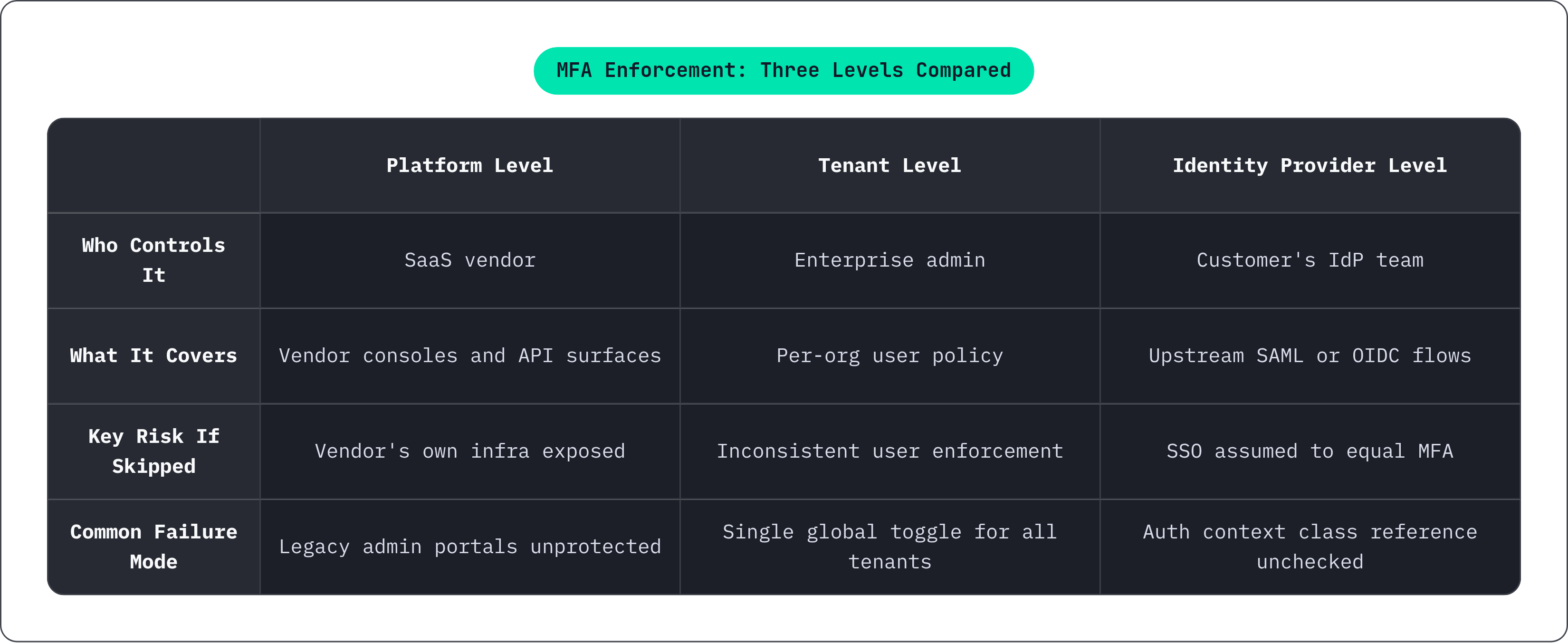
In B2B SaaS, real enforcement happens on three levels at once. There's the platform level, where the vendor locks down its own admin consoles and API surfaces. There's the tenant level, where each enterprise customer's admin sets and enforces policy for their own users inside your product. And there's the identity provider level, where MFA gets enforced upstream through the customer's own SAML or OIDC setup, and your app just needs to respect it instead of getting in the way.
Here's a mistake that trips up even security-conscious teams: assuming SSO equals MFA. Plenty of organizations wire up single sign-on and call the MFA box checked without ever confirming their identity provider is actually demanding a second factor. SSO tells you someone authenticated somewhere. It says nothing about how many factors it took to get there.
Enterprise customers don't want the same policy, either. A hospital system might demand MFA on every single login, no exceptions. Another customer, maybe a five-person marketing agency using your tool for reporting, wants it optional so their interns don't call support every Monday. One global switch can't serve both. The real design question is how you build controls tight enough for your strictest customer without making the product miserable for everyone else.
How major platforms are normalizing mandatory MFA — and what that signals for every SaaS vendor
Microsoft's rollout is the clearest example of a big platform just deciding: no more opt-out. Phase one locked down admin portals across Azure, Entra, and Intune, covering any create, read, update, or delete action. Phase two went further, pulling in CLI tools, PowerShell, the mobile app, infrastructure-as-code tools, and REST API endpoints, though read-only operations got a pass. Customers running complicated environments could ask for a postponement window, but the mandate itself wasn't up for negotiation. That's a big signal.
There's a practical fallout here too. Teams that built integrations relying on legacy authentication, specifically the OAuth ROPC pattern where a username and password get passed directly, now have to rip that out and update their SDKs, because ROPC and MFA simply don't get along.
Salesforce is heading the same direction, expecting MFA enforced consistently across environments, SSO included, rather than assumed to be somebody else's job downstream.
What does this mean if you're building a SaaS product on top of this infrastructure? The baseline is rising, and fast. Enterprise procurement teams and security reviewers now expect the same discipline from your app that they're getting from Microsoft and Salesforce. If you haven't built per-tenant enforcement controls yet, you're going to start failing security questionnaires, and that's not a hypothetical, that's a Tuesday.
Designing enrollment flows that don't create drop-off before enforcement kicks in
Enrollment is where MFA rollouts go to die. Get it wrong and you'll generate a flood of support tickets, users finding creative workarounds, and an executive somewhere demanding an exception "just for now" that becomes permanent by next quarter.
A phased approach works better than flipping a switch. Start with an awareness period: show prompts explaining what's coming and why, without blocking anyone yet. Move into a grace period where login still works but enrollment is required before a visible deadline, ideally with a countdown so nobody can claim they didn't see it coming. Then, hard enforcement: access to protected resources stops until enrollment is done.
Enrollment shouldn't wait on users to stumble across a settings page either. Admins need the ability to push enrollment links directly, so it's not a scavenger hunt.
Method selection matters more than people give it credit for. Present a clear order: authenticator app first, hardware token second, SMS as the fallback for people who genuinely have no other option. SMS is still the method most people recognize on sight, but it's exposed to SIM swapping, so steering users toward app-based TOTP codes or passkeys pays off without abandoning the folks who can't use anything else.
Backup and recovery setup at the moment of enrollment, not after someone's already locked out at 2 AM, is one of the most skipped steps in the whole process, and one of the most expensive to fix after the fact. For enterprise tenants running SSO, enrollment might happen entirely inside the customer's own identity provider. Your app needs to recognize and trust that, not throw up a redundant second challenge that just annoys people who already did the work.
Building per-organization MFA policy controls for enterprise admins
Enterprise customers want to run their own show. They expect to set MFA policy for their organization independent of whatever the tenant next door is doing.
The admin interface needs a handful of real controls, not a single toggle. MFA requirement should scale from off, to optional, to required for everyone, to required just for certain roles. Allowed factor types need a range too, from hardware tokens only, to app-based codes, to SMS if the customer insists. Session lifetime matters as much as the login itself: how long does an MFA-verified session stay trusted before it has to prove itself again? Trusted device settings, where a user can register a device and skip repeated prompts for some configurable window, round out the list.
SSO delegation deserves real care here. If an enterprise customer already enforces MFA through their own identity provider, your platform should accept that the assertion means MFA happened, and skip the redundant challenge. Double-prompting is one of the most common enterprise complaints, and it's completely avoidable.
Trust needs verification behind it, though. Checking that MFA actually occurred, not just that authentication succeeded, means reading the authentication context class reference inside the SAML or OIDC token. Skip that check and you're trusting a claim you never actually confirmed.
Guest accounts need their own attention too. In a lot of enterprise SaaS environments, guest and external collaborator accounts outnumber the actual licensed employees, and they frequently end up with the same permissions as full-time staff while sitting outside MFA policy entirely. That's not a small gap. Admin controls need to close it directly, not treat it as an edge case.
Step-up authentication for sensitive actions within an active session
Somebody passing MFA at login doesn't mean they should get a free pass for the rest of the session. Session cookies and OAuth tokens can stay valid long after the moment of authentication has come and gone, which means a stolen session is functionally the same as a stolen identity.
Step-up authentication closes that gap by demanding a fresh MFA challenge for specific high-risk actions, regardless of how recently the user logged in. Think bulk data exports, billing changes, production API key creation, admin privilege grants, or deleting anything meaningful. A user who authenticated ten minutes ago should still get challenged again if they suddenly try to export the entire customer database.
This lines up with existing assurance level frameworks. Most everyday SaaS logins sit comfortably at AAL2, meaning two factors were verified. Privileged admin actions deserve AAL3, which means hardware-backed or phishing-resistant factors, not just another six-digit code from an app.
The trigger has to be the action itself, not a timer counting down session age. There's a specific reason this matters: a meaningful share of stolen credentials found in recent incident analysis included active session cookies alongside them, meaning the attacker had already passed MFA at login and was simply operating inside a session that was still valid. Step-up authentication is what catches that.
Handling exceptions, break-glass accounts, and MFA bypass requests without creating permanent holes
The moment enforcement goes live, the exception requests start rolling in. Service accounts nobody documented, legacy integrations from 2019, shared logins the sales team swears they need, and someone traveling somewhere their authenticator app refuses to work. All in the first week.
Service accounts and machine-to-machine integrations shouldn't be running through human MFA flows at all. Give them API keys or client credentials scoped down to the minimum permissions they actually need, and treat that as its own credential category entirely, not a workaround.
Break-glass and emergency admin accounts need tight scoping, alerting on every single use, and manual review rather than automated session handling. Temporary user exceptions should be time-bound, logged, and tied to a documented reason, never open-ended.
Conditional access gives you a better tool than a flat bypass. Instead of exempting someone from MFA outright, wrap the exception in other conditions: trusted network, managed device, recent re-enrollment. That way the exception is bounded by something, rather than being a blank check.
An exception without an expiry date isn't an exception anymore; it's a permanent hole that quietly accumulates until someone finds it during an audit and asks how long it's been open. The platform should enforce expiry automatically, at the infrastructure level, rather than counting on an admin to remember. Every exception needs its own audit trail: who asked for the bypass, who approved it, when it expires, and every time it gets used.
Integrating with enterprise identity providers without creating a conflicting second policy
Most enterprise customers already have Active Directory, Okta, or something similar running the show, and they expect your product to plug into that rather than building a second parallel login system nobody asked for.
The right architecture enforces MFA at the identity provider level using SAML or OIDC, so every downstream application inherits the same policy automatically instead of building its own MFA logic from scratch.
Your job on the SaaS side comes down to a few things. Read the authentication context class reference correctly, so you know MFA actually happened rather than just assuming it did. Refuse sessions where your organization's policy requires MFA but the identity provider's assertion doesn't confirm it. Also, don't throw up a second MFA prompt when the identity provider already handled it. That's just annoying.
ROPC-style flows, or anything that passes a username and password directly, are simply incompatible with identity-provider-mediated MFA. These need to get identified and migrated well before any enforcement deadline hits, a lesson Microsoft's rollout made unmistakably clear.
For customers who don't have a corporate identity provider at all, your platform still needs policy controls with the same level of detail. Falling back to one global setting isn't going to cut it in an enterprise sales conversation. Don't forget the token itself, either: OAuth tokens issued right after an MFA-verified login can quietly outlive the intent behind that check. Regular token review and forced re-authentication intervals shrink the window between a compromised token and someone actually noticing.
Audit logging as the evidence layer that makes MFA enforcement real
Enterprise customers and their auditors want proof MFA is working, and logs are the only thing that counts as proof.
A complete MFA audit trail needs to capture enrollment events (which factor, which user, what time, what device), every successful and failed challenge with device and IP details, step-up triggers and whether they succeeded, bypass events including the reason and the approving admin, and recovery actions like backup code use or admin-assisted resets. Impossible travel signals, like a login from Chicago followed by one from Warsaw twelve minutes later, belong in there too.
Per-tenant isolation matters just as much as what's in the log. Enterprise customers expect access to their own organization's authentication history, not data mixed in with other tenants or locked behind a support ticket they have to file and wait on.
Retention has real teeth behind it. Compliance frameworks including SOC 2, HIPAA, and PCI DSS all require authentication logs to stick around, and a full year is a defensible floor for most enterprise contexts.
These logs aren't just for the auditor either. They feed directly into adaptive MFA decisions, since anomalous login patterns, repeated failed attempts, and impossible travel all roll into risk scoring that can trigger extra challenges automatically. For European customers, remember these logs contain personal data, IP addresses, device identifiers, timestamps, all of it. That means retention limits, access controls, and proper data processing agreements, and hosting that data in European infrastructure makes the compliance side considerably easier to manage.
Adaptive and risk-based MFA as the next layer beyond static enforcement
Static MFA, the same challenge every time regardless of context, eventually becomes a ceiling. It caps how secure you can get and how usable the product stays, especially once you're operating at enterprise scale.
Attackers have already adapted around it. Adversary-in-the-middle proxy kits, which intercept session tokens in real time, are cheap and widely available now, which makes session hijacking a viable attack path even after someone passes MFA cleanly. A static challenge that never changes is a static target.
Adaptive MFA responds by layering risk signals onto the authentication decision instead of treating every login the same. Device posture matters: is this a managed device with a certificate and an endpoint detection agent actually running, or a random laptop nobody's ever seen. Network context matters: corporate VPN and known office IP ranges look different from an unrecognized connection halfway across the world. Behavioral signals matter too, things like login time, location, and how fast someone's authenticating from two different places. The risk level of the action itself should factor in as well, because exporting the entire customer list deserves more scrutiny than checking a dashboard.
Put those signals together and MFA becomes a decision engine that gets stricter exactly when the situation calls for it, and stays out of the way when it doesn't, rather than a single gate everyone walks through the same way. That's the direction enterprise security is heading, and static, one-size-fits-all enforcement is already starting to look like yesterday's answer.