Passkey Authentication Implementation for SaaS Web Applications
Passkeys eliminate 80% of web breaches and speed logins 20x—here's how to ship them.
Passkeys are no longer a "someday" feature. As of 2025, the FIDO Alliance counts 5 billion passkeys in active use, spread across 15 billion online accounts that support them. If you build a SaaS product and haven't shipped passkey login yet, this piece walks through exactly how to do it, from the cryptography underneath to the fallback screen you'll need for the guy who lost his phone at a wedding.
What a passkey actually is — the cryptographic model in plain terms
Here's the trick that makes the whole thing work: a passkey is a key pair. One half, the private key, never leaves the device. It sits in the Secure Enclave on an iPhone, or a TPM chip on a Windows laptop, and it doesn't travel anywhere, not even during login. The other half, the public key, sits on your server. If your database gets breached, an attacker walks away with a pile of public keys that are about as useful to them as a photo of a lock.
WebAuthn is the actual browser API behind this. Passkey is just the friendlier name people started using once these credentials could sync across devices through iCloud Keychain, Google Password Manager, or a password manager like 1Password. Quick distinction worth keeping straight: a hardware security key (like a YubiKey) is a WebAuthn credential, but it's device-bound, so it isn't technically a "passkey" in the synced sense, even though people use the terms loosely.
The math behind why this is strong authentication is simple. You've got "something you have" (the device) combined with "something you are" (your fingerprint or face) or "something you know" (your PIN). That's multi-factor authentication squeezed into a single tap, no separate authenticator app required.
And here's the part that actually kills phishing dead: a passkey is cryptographically welded to the domain it was created on. A lookalike phishing site can trick a human, sure, but it cannot trick the browser. The browser checks the origin at the protocol level and simply refuses to hand over the credential if the domain doesn't match. No amount of social engineering gets around that.
For anyone who needs the paperwork trail: NIST's SP 800-63-4, finalized in July 2025, classifies synced passkeys at Authenticator Assurance Level 2 (AAL2). Device-bound credentials, such as a hardware security key, can reach AAL3, the top tier. Two more terms you'll see constantly for the rest of this piece: registration (creating the credential) and authentication (using it to log in). Everything below builds off those two ceremonies.
The security and business case worth understanding before writing any code
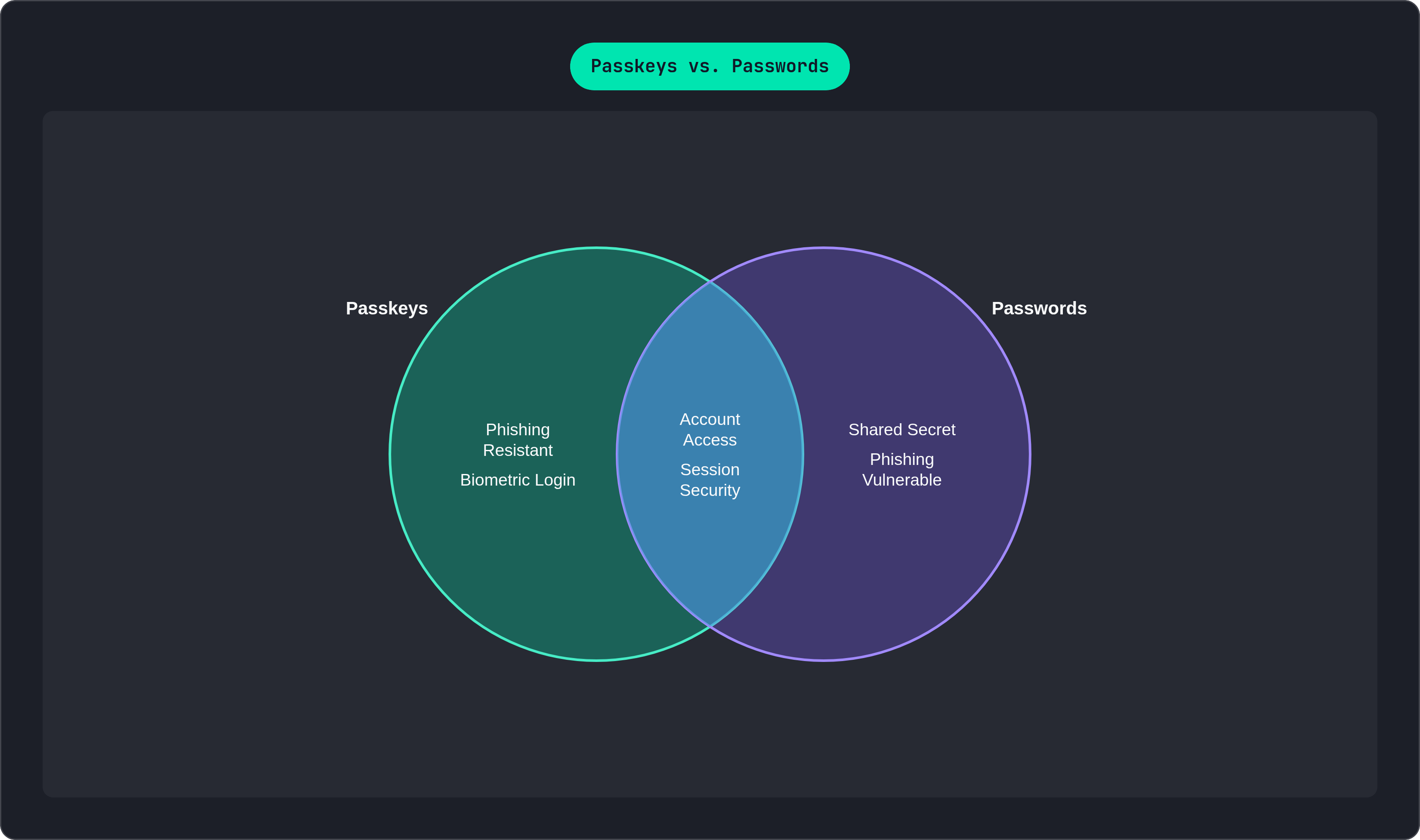
Start with the number that should make any engineering lead sit up straight: over 80% of web application breaches trace back to stolen or weak credentials, according to the 2025 Verizon Data Breach Investigations Report. Passwords aren't just annoying, they're the leading cause of the thing keeping your CISO up at night.
IBM's Cost of a Data Breach Report 2024 put a dollar figure on it too: credential-related breaches average north of $4.5 million. And Microsoft's Digital Defense Report 2024 found that switching from passwords-plus-SMS-OTP to phishing-resistant authentication cut successful account compromise by more than 99%. That's not incremental. That's a different category of outcome.
Now the part that actually gets budget approved: passkeys are faster, and the data backs it up hard.
- FIDO Alliance's 2025 Passkey Index found a 93% login success rate for passkeys versus 63% for other methods, completing in about 8.5 seconds compared to 31.2 seconds.
- HubSpot made passkeys the most visible login option in December 2024 and saw login success rates climb 25%.
- TikTok clocked a median passkey sign-in of 1.9 seconds. That's roughly 20 times faster than phone or email login.
Support teams should be paying attention here too. Password resets eat up an estimated 30 to 40% of support ticket volume at SaaS companies, and FIDO's 2025 Passkey Index reports an 81% drop in login-related help-desk tickets after passkey rollout. Put plainly: fewer forgotten passwords means fewer angry emails to your support inbox at 2am. That's the pitch. It writes itself once you put the abandonment and support numbers side by side in the same slide.
What the registration ceremony does and how to implement it
Registration has four steps, and none of them are optional.
Step 1: Your server generates a challenge, a random string that can't be guessed or reused. Alongside it, you send Relying Party (RP) info, meaning your app's name and domain, plus user info like a user ID and display name.
Step 2: The frontend calls navigator.credentials.create(), passing along the options object your server just built. From here, the browser takes over completely and handles the Face ID prompt or the fingerprint scan. You don't write any of that UI yourself.
Step 3: The browser hands back a credential, which includes the new public key, a credential ID, and attestation data. All of that travels from the frontend back to your server.
Step 4: Your server checks that the challenge matches what it issued, confirms the origin lines up with your RP ID, then stores the public key, credential ID, and a signature counter.
A few settings inside that create() call matter more than they look. Set authenticatorSelection.residentKey to "preferred" or "required" if you want discoverable credentials, which you'll need for usernameless login later. Set userVerification to "preferred" to force the biometric or PIN step rather than skip it. Use excludeCredentials to stop someone from registering the same fingerprint twice on the same device. And for attestation, "none" covers the vast majority of SaaS use cases; only reach for "direct" or "enterprise" if you have a compliance reason to verify exactly which authenticator model someone used.
One hard rule: HTTPS is not negotiable. WebAuthn refuses to run over plain HTTP, full stop, except on localhost. Your staging environment needs a real TLS certificate, not a self-signed one your browser complains about.
Don't write the cryptographic verification yourself. Use a library: SimpleWebAuthn for Node or TypeScript, go-webauthn for Go, py_webauthn for Python. They handle the CBOR decoding and challenge verification correctly, which is exactly the kind of code you don't want to debug from scratch at 11pm before a launch. Worth flagging now, because it'll matter in the next section: none of these libraries store anything for you. Schema design is entirely on you.
What the authentication ceremony does and how to implement it
Authentication mirrors registration, but with a signature instead of a new key.
Step 1: Server generates a fresh challenge, never reused from a prior attempt. You can optionally pass allowCredentials with the user's known credential IDs, or omit it entirely for a usernameless flow.
Step 2: Frontend calls navigator.credentials.get(). The browser finds a matching credential, prompts for the biometric or PIN, and signs the challenge using the private key that never left the device.
Step 3: The browser sends back an assertion: the signed challenge, authenticatorData, clientDataJSON, and the credential ID.
Step 4: Server verifies everything. Challenge matches. Origin and RP ID match. Signature checks out against the stored public key. And then the part people forget: check the signature counter. If the incoming count is less than or equal to what you have stored, reject it and flag it, because that's the signature of a cloned credential.
Step 5: On success, issue a session, either an HttpOnly, Secure, SameSite=Strict cookie or a signed opaque token.
The nicest UX pattern available right now is conditional UI, sometimes called passkey autofill. Call navigator.credentials.get() with mediation: "conditional" when the page loads, and the browser will surface available passkeys right inside the username field's autofill dropdown. No modal, no separate button, no username typed at all if the user doesn't want to.
One thing worth saying plainly: passkeys kill credential theft, but they don't touch session hijacking. You still need token rotation, CSRF protection, and correct cookie flags. A stolen session cookie doesn't care how strong your login was. And for every authentication attempt, log the credential ID, timestamp, IP, user agent, and the sign count before and after. That log is what lets you catch a cloned credential before it becomes a headline.
Designing the database schema to store passkey credentials correctly
The bare minimum is two tables: a users table (userid, username) and a credentials table (credentialid, userid as a foreign key, publickey, signature_count). That's the floor, not the ceiling.
Here's the thing people get wrong on day one: users don't have one passkey, they have several. A phone, a laptop, maybe a hardware key sitting in a drawer for emergencies. Your schema needs a one-to-many relationship between users and credentials from the very start, because retrofitting that later is a miserable migration.
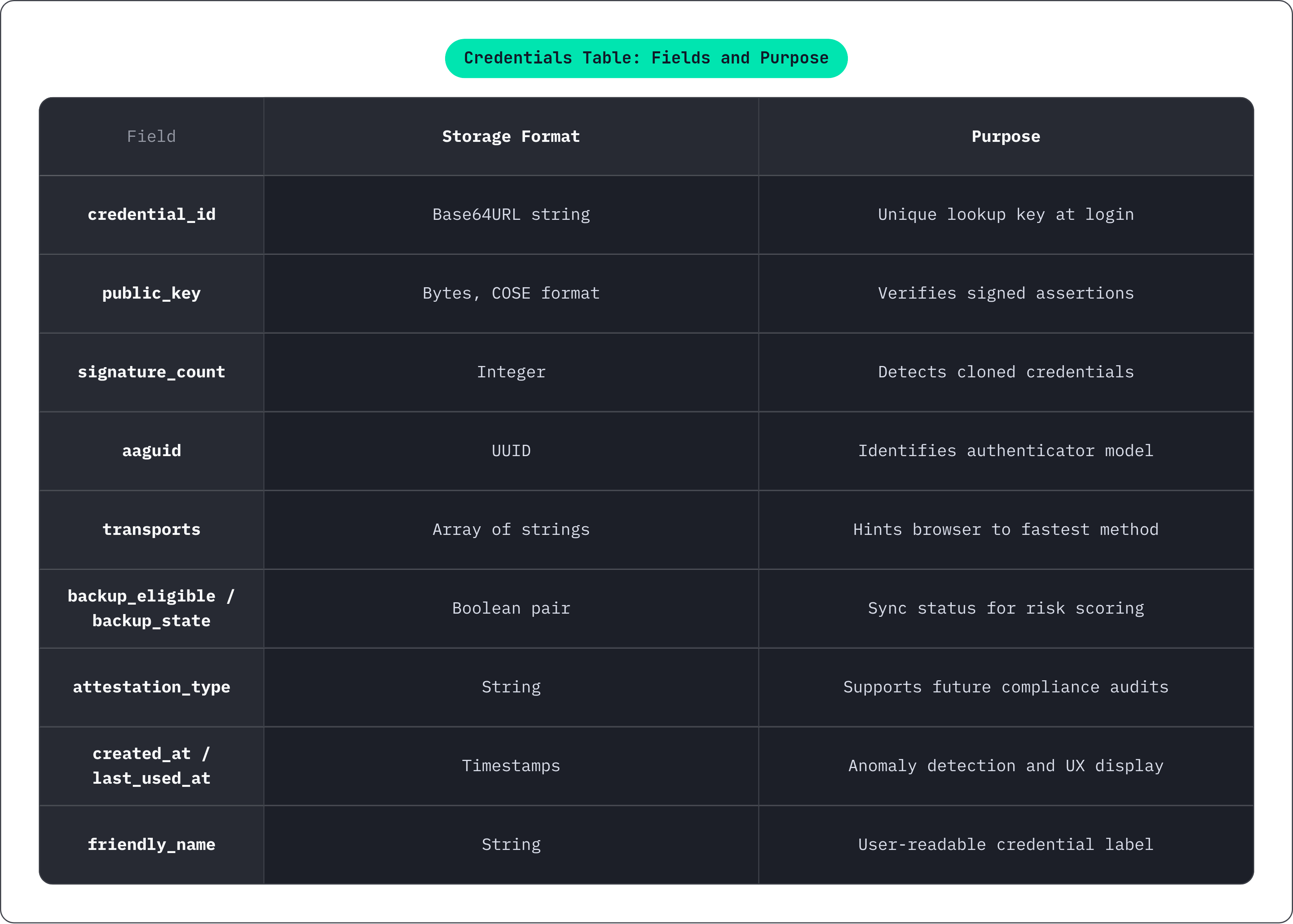
The fuller credentials table looks like this:
credential_id, Base64URL encoded, unique. This is your lookup key at login time.public_key, stored as bytes in COSE format, not as a plain string.signature_count, incremented on every successful login. A count lower than what's stored means reject immediately, no exceptions.aaguid, which identifies the authenticator model. Useful later for audits and policy enforcement.transports, an array like 'internal', 'hybrid', 'usb', 'nfc'. It hints to the browser which method to try first, which shaves real time off login.backupeligibleandbackupstate, both booleans. Together they tell you whether a credential can sync across devices and whether it already has, which matters a lot for risk scoring.attestation_type, worth storing even when you accept "none", because a compliance audit two years from now will ask for it.createdatandlastused_at, for the credential management screen and for spotting anomalies.friendly_name, something like "iPhone 15" or "Work laptop", so users can actually tell their credentials apart.
Index credentialid for fast lookups at login, and index userid so the management page can list a user's credentials without scanning the whole table. And to repeat the point from earlier because it bears repeating: across every major library out there, storage is not their job. It's yours.
Fallback strategies and account recovery when a passkey is unavailable
Phones get lost. Laptops get replaced. Someone shows up on an old Android build that doesn't fully support the WebAuthn API yet. None of that is rare, and none of it should lock a paying customer out of their account permanently.
Build a fallback hierarchy, roughly in this order of preference:
- Email magic link. Stateless, reasonably phishing-resistant, no shared secret sitting in your database.
- TOTP through an authenticator app, a fine second option for users who already have one set up.
- Recovery codes, generated once at registration, hashed before storage, single-use. Tell users clearly to save them somewhere safe, because they will not remember on their own.
- Password, last on the list. If you offer it at all, enforce a real password policy and nudge the user toward registering a passkey the next time they log in.
Don't force a passkey at signup. Let people register with whatever they're used to first, then prompt for passkey enrollment in a friendly banner once they've had a win, like right after their first successful login. This is progressive enrollment, and it removes almost all the friction that makes new auth methods feel like homework.
Also offer passkey registration again whenever someone logs in from a new device using a fallback method. Otherwise you end up with the single-device lock-in problem, where a user's entire passwordless setup lives on one phone and nowhere else.
None of this works without a credential management page. Users need to see every passkey attached to their account, with friendly names and last-used dates, add new ones, and revoke old ones themselves. Skip this and every lost-phone situation turns into a support ticket instead of a two-click fix. On the backend, log every failed assertion with the credential ID and the reason it failed before you fall back to another method. That log is what tells you whether you're looking at a stolen credential or just someone's kid dropped their tablet in the pool.
Multi-tenant SaaS considerations: RP ID, tenant isolation, and enterprise policies
The RP ID has to be a registrable domain suffix of wherever the page is running. Set it to "example.com" and a passkey registered on "app.example.com" will work across every subdomain hanging off that root, which is genuinely convenient for a multi-tenant product with per-customer subdomains.
Custom domains break this cleanly in half. If a customer points "customer.com" at your app instead of using "customer.yourapp.com," the RP ID cannot span both domains; a passkey registered on one will not work on the other. This needs to be a design decision made early, not something discovered when your biggest account complains.
Inside the database, always scope credential lookups to the correct tenant. A credential ID collision across tenants should be vanishingly unlikely, sure, but "unlikely" is not the same as "not a real attack surface," so isolate the lookup anyway.
Enterprise buyers will ask for things your smaller customers never think about. Some will want authentication locked to hardware-bound passkeys only, to satisfy AAL3 requirements. The backup_eligible and aaguid fields you already stored let you enforce that policy without a single schema migration, which is exactly why it's worth getting the schema right the first time.
Passkeys also aren't a replacement for SSO. Plenty of your B2B users already authenticate through SAML or OIDC, and passkeys sit alongside that as an option for direct logins, not instead of it. Your session layer needs to know which method was actually used, because your compliance team will eventually ask.
The enterprise appetite here is already visible in the wild. Per Dashlane's Passkey Power 2025 report, Ramp saw 172% passkey growth, Sophos 57%, HubSpot 34%, and Ubiquiti 37%. Enterprise buyers aren't waiting for you to convince them anymore; they're showing up already expecting it.
Testing passkey flows before shipping to production
Test across the actual combinations your users will show up with, because each one behaves a little differently:
- Chrome on Android, backed by Google Password Manager.
- Safari on iOS and macOS, backed by iCloud Keychain.
- Chrome and Edge on Windows, backed by Windows Hello and the TPM chip.
- Firefox, which supports WebAuthn but handles platform passkey sync on its own terms, so don't assume parity and test it directly.
Chrome DevTools ships a virtual authenticator you can use to simulate registration and login without needing a real fingerprint sensor or a second physical device sitting on your desk. It's not a substitute for testing on real hardware before launch, but it'll save you a lot of walking back and forth to grab your phone during development.