Role-Based Access Control Modeling for Multi-Tenant SaaS
Tenant-scoped roles in your database schema prevent costly rewrites and permission leaks later.

Multi-tenant RBAC is a data modeling problem as much as a security problem. Get the tenant-scoping right at the schema level, and the rest (roles, permissions, audits) falls into place. Get it wrong, and you're rewriting your access control from scratch right around the time your first enterprise customer signs.
Single-tenant RBAC is the easy version of this game. Permissions get bundled into roles, roles get handed to users, and the whole thing lives happily inside one application boundary. Multi-tenancy throws a wrench in that: now the same person can be an Admin in one workspace and a Viewer in another, and your system needs to know the difference without getting confused about which hat someone's wearing. That's the whole ballgame here, and it means roles belong to the tenant, not the application.
Four words are going to carry the rest of this piece, so let's nail them down. A tenant is your isolation boundary, whatever you call it internally (organization, workspace, account), and a role is a named bundle of permissions, scoped to one tenant. A permission is one discrete action on one resource, think "delete invoice" or "invite member," while a principal is whoever's asking to do something, a user or a service account.
Why obsess over this now instead of later? Because retrofitting multi-tenancy after launch is expensive in a way that's hard to appreciate until you're the one doing it. Bolting a tenant concept onto a schema that was never built for it usually costs several times more than building it in from day one, and that's before you count the sleepless nights spent chasing down a bug where User X can somehow see User Y's invoices.
The organization layer: the entity most SaaS data models are missing
Here's a pattern I've seen play out at more startups than I'd like to admit: the data model has users, it has resources (projects, documents, whatever the product actually does), and it has absolutely nothing sitting between them. No organization. No tenant. Just users and stuff, floating in the same global pool like it's 2011 and multi-tenancy is somebody else's problem.
The fix is to add an organization entity that sits between your global user pool and everything underneath it. One pool of users, many organizations, and a membership relationship connecting the two. As outlined in logto.io's January 2025 guide to multi-tenant architecture, a user row stays global, and their role lives in a separate relationship tying that user to a specific org and a role label.
In practice, that's a membership table: userid, orgid, role, with one row per relationship. This one design choice is what lets the same person be an Owner in one org and a Member in another without you needing to duplicate their user record like some kind of digital cloning experiment.
The mistake, and it's a common one, is jamming tenant context onto the user record itself, maybe an org_id column sitting right there on the users table. It looks fine at first. Then your second customer signs up, wants to invite someone who's already a user elsewhere in your system, and your schema has no way to express "this person belongs to two places now." Rigid, brittle, the kind of thing that turns a two-hour feature request into a two-week migration.
Most B2B products don't need to overthink their starting roles. Owner, Admin, Member gets you further than you'd think. And one design decision worth naming out loud, early, is how people actually join an org: invite-only, self-serve signup, or domain matching (anyone with an @yourcompany.com email gets in automatically). That choice ripples into your UX and your enforcement logic, so don't leave it implicit.
Scoping roles to tenants without leaking permissions across boundaries
Once you've got tenants modeled, the next danger is a permission check that forgets to ask "which tenant, though?" A check that verifies a user's role but skips filtering by org_id will happily let someone in Tenant A start poking around Tenant B's data. That's a genuinely common bug class, and it's the kind that ends up in a very awkward customer email.
The rule to tattoo somewhere visible: every permission check needs three inputs, not two. Who's asking, what are they trying to do, and where (which tenant) are they trying to do it. Drop that third input and you've built a system that works fine in your demo and fails the second you have real customers with real boundaries.
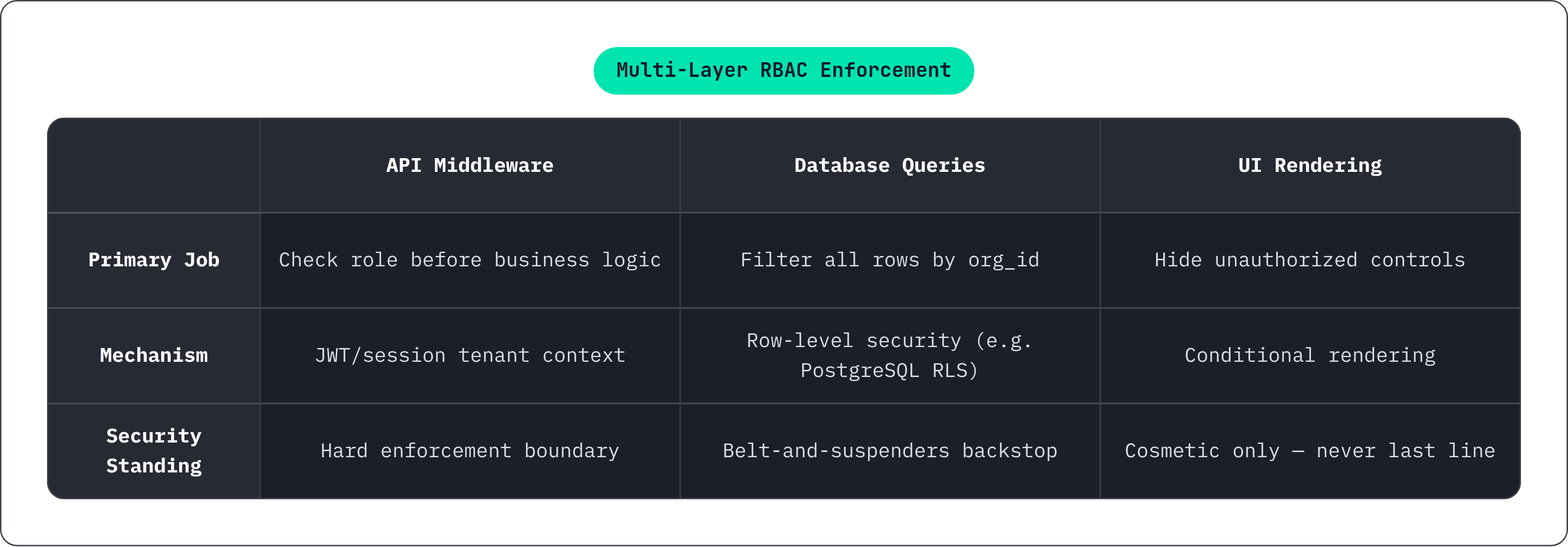
Enforcement has to happen at more than one layer, and each layer has a different job:
- API middleware. Pull tenant context out of the JWT or session, check the role, before any business logic runs.
- Database queries. Filter by
org_id, always, no exceptions. Row-level security in PostgreSQL is worth looking at here; it lets the database itself refuse to return rows outside the current tenant, which is a nice belt-and-suspenders move. - UI rendering. Hide the buttons someone shouldn't click, sure. But that's cosmetics, not security, since anyone with dev tools open can still fire the API request directly, so the UI layer is never allowed to be your last line of defense.
On the token side, keep JWTs lean. Include org_id and role claims scoped to the current session, and resist the urge to cram every tenant a user belongs to into one long-lived token. Fetch role context per session or per request instead. It's a little more plumbing, but it keeps your tokens from becoming a leaked map of someone's entire professional life.
Here's a wrinkle worth sitting with: Stytch's RBAC explainer walks through a case where a "Project Manager" role can create and assign tasks in one tenant, but only create tasks (no assigning) in another. Same role name, different rules, because the tenant defines the policy. Your model has to support that without forking the role definition globally every time a customer wants slightly different rules. That's a scoping problem, not a naming problem.
And the default posture, always: new members land in the most restricted role available. Elevation should be a deliberate, visible action, not a default setting somebody forgot to change.
Extending the model down a resource hierarchy: teams, projects, and folders
Plenty of SaaS products don't stop at the org level. There's a second layer underneath: teams, projects, boards, folders, pick your noun. And permissions inside that layer often need to be different from the blanket org-level role.
The good news is you don't need a new pattern. The same membership-relation trick from the org level just replicates one level down: userid, resourceid, resource_type, role, scoped inside the org.
But there's a question you cannot dodge: does an Org Admin automatically get full access to every project underneath them, or does project access need its own explicit grant? Both answers are reasonable, and plenty of successful products do it either way. What's not reasonable is leaving that decision implicit, buried in whatever the original engineer happened to write on a Tuesday afternoon. Implicit inheritance is exactly how privilege escalation bugs sneak in; somebody adds a new project type six months later, forgets the "admins can see everything" rule applies here too, and now there's a hole nobody meant to dig.
You don't always need a resource-level role, either. If your product has private projects or confidential workspaces, you need one. If everything inside an org is visible to everyone in that org, adding resource-level roles is just extra complexity buying you nothing, like adding a second lock to a door with no walls around it.
Worth naming your roles precisely here too. "Org Admin" and "Project Lead" might overlap heavily in what they're allowed to do, but their scope of authority is different, and they should be modeled as genuinely different role types, not the same role stretched across two levels. And in practice, most B2B products max out at two or three scope levels: org, and maybe one resource layer underneath. Anything deeper should be a deliberate product decision, not something your architecture backed you into.
Where flat RBAC runs out and ABAC fills the gap
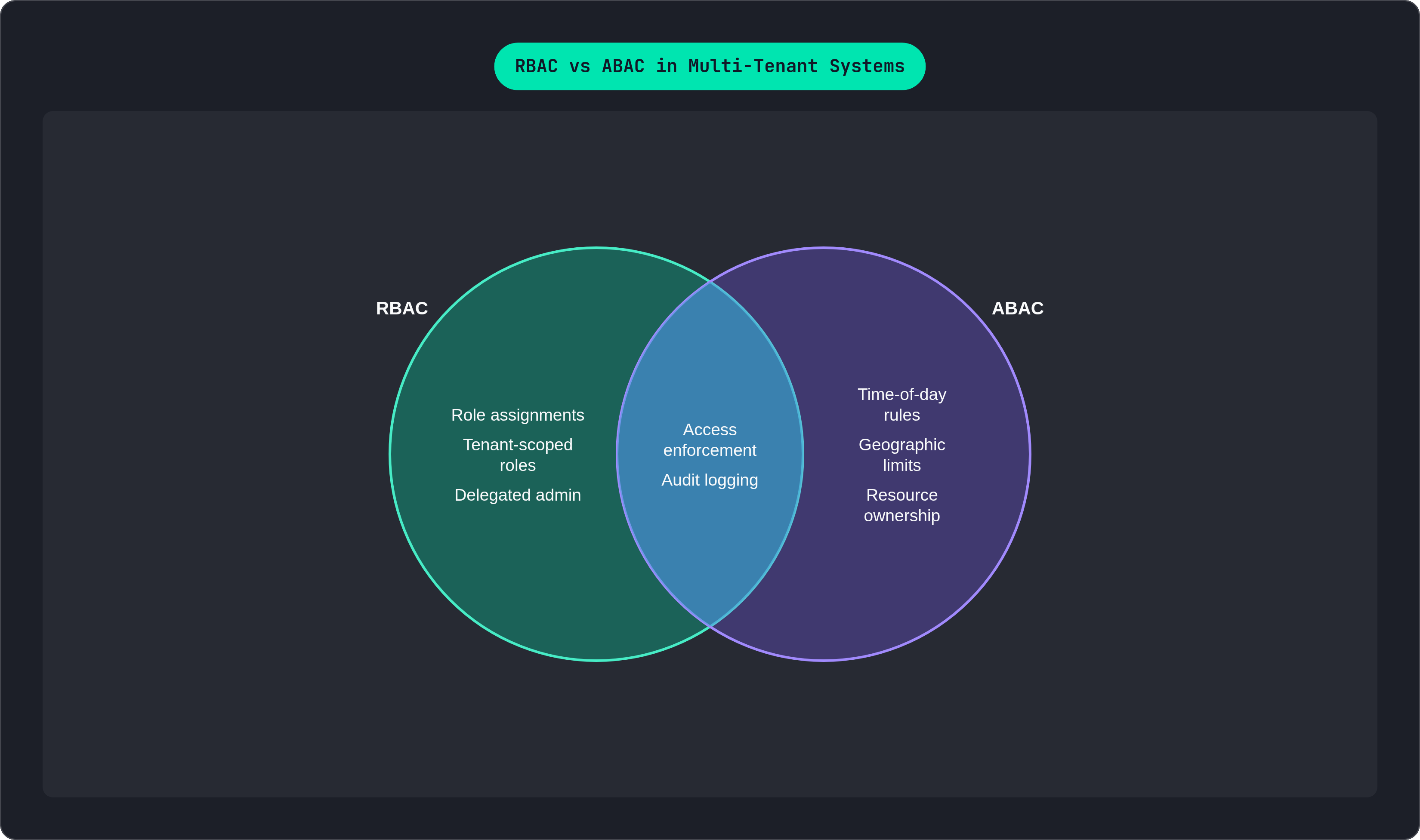
RBAC answers one question well: what role does this person hold in this tenant? It starts to wobble on a different, harder question: can this person act on this specific resource, right now, given everything else going on?
That "everything else" is where things get interesting. Time-of-day restrictions. Geographic limits. Resource ownership rules like "only the person who created this can delete it." Subscription tier gates, "this feature's Pro-only." None of that fits cleanly into "what's your role."
That's the gap attribute-based access control fills. As LoginRadius describes in their January 2026 IAM guide, ABAC evaluates contextual attributes (department, region, resource state, plan level) instead of just checking role membership. It's a different lens on the same problem.
The pattern that works in practice is layering. Use RBAC as the first gate (is this person's role even allowed to attempt this class of action) and then use attribute checks for the finer conditions on top. Skip the layering and you end up with role explosion: a "Project Manager Who Can Assign But Only On Weekdays" role, and its six increasingly specific cousins, until your role list looks like a phone book nobody wants to read.
There's a sharp AI-specific version of this problem too. UnifiedAIHub's December 2025 blueprint lays it out clearly: when a user queries an AI feature backed by a RAG pipeline, tenant-scoped RBAC alone doesn't cut it. You need the retrieval layer itself checking that documents belong to that user's org (document.orgid == user.orgid) on top of the role gate that let them use the AI feature at all. Miss that attribute check, and your chatbot might cheerfully summarize a competitor's confidential doc because nobody told the retrieval layer to mind its own tenant.
And the tell that you need ABAC, if you're wondering: permission logic starts showing up as if-else chains buried in service code instead of one clean check at the boundary. That's the model telling you it's outgrown itself.
Delegated administration and tenant-defined roles
In most B2B SaaS, the person managing an org's members isn't you. It's the customer's own IT lead or team manager, and they need to invite people, assign roles, and revoke access without filing a support ticket every time someone leaves the company.
That's delegated administration: an Org Admin who can manage membership and roles inside their own tenant, full stop, with zero visibility into anyone else's. Supporting that properly on the product side means a few specific things.
- Member management UI that's scoped tightly to that admin's own org, nothing more.
- Role assignment that only shows the admin roles they're actually allowed to grant. An Admin shouldn't be able to hand out a role above their own station.
- An audit trail of who granted what to whom, and exactly when.
Some tenants will eventually want roles you didn't build. That's a real product decision with real architectural weight behind it. Custom roles need to live per-tenant in the database, not hardcoded into your app. You'll also need a permission registry, basically a canonical list of every permission that exists, so custom roles have a known set of building blocks to draw from instead of a free-for-all. And you need a validation step on creation, because a customer will absolutely, at some point, accidentally build a "read-only viewer" role that can also delete the entire workspace.
Separately from all of this: your own staff need a super-admin role for support and operations, one that can cross tenant boundaries when there's a genuine reason to. That role has to be modeled apart from any tenant-scoped admin role, and it deserves MFA and tight audit logging, because it's the one role in your whole system that, if compromised, doesn't just hurt one customer.
Audit logging as a structural requirement, not an afterthought
Least-privilege only means something if you can catch it failing. Without audit logs, RBAC is a lock with no camera pointed at the door; you've restricted access, but you have no idea who tried the handle.
Every authorization event deserves a record with five things: who did it (user and their role at the time), what they tried to do, where (tenant and resource), the outcome (granted or denied), and when. Miss any of those five and you've got half a story.
Log the denials, not just the approvals, because failed attempts often tell you more than successful ones. A string of denied requests hitting the same endpoint is usually more interesting than a thousand normal logins.
Isolation matters here too, same as everywhere else in this piece. An Org Admin reviewing audit logs should only ever see events inside their own org. If they can see another tenant's activity in their audit trail, you've built a leak.
If your product has AI features, this gets sharper, not softer. IBM Security reported that 43% of enterprises had an AI-specific security incident somewhere in their SaaS stack in 2025. For any product doing retrieval or model calls, your audit log needs to capture which tenant's data got pulled, by which model call, under whose authorization. Otherwise "the AI said something it shouldn't have" becomes a mystery with no paper trail.
On the schema side, keep it simple: an append-only log table, no updates, no deletes, with a read path that's separate from your application's normal write path. And don't treat this purely as a compliance chore. Enterprise buyers ask about audit logging routinely during evaluation, and shipping it early covers you legally while also acting as a trust signal that tells a prospective customer you've thought about this before they had to ask.
Common RBAC implementation mistakes that create access-control debt
A quick rundown of the ways teams paint themselves into a corner, most of which I've watched happen firsthand:
- Hardcoding roles in application code. Every role tweak now needs a deployment, and tenant-specific customization is basically off the table.
- Checking permissions inside business logic instead of at the API boundary. The logic scatters across your codebase, and it's dead easy to forget a check when someone ships a new endpoint on a Friday afternoon.
- One global admin role instead of scoped ones. Platform-level admin and org-level admin sharing a name is a privilege escalation bug that just hasn't happened yet.
- Trusting the frontend to enforce anything. Hiding a button is a UX decision. The API has to independently verify every action, because the frontend is optional the moment someone opens a network tab.
- Tenant context living on the user record instead of a membership relation. This one quietly makes multi-org membership impossible without duplicating users, which nobody wants to explain in a design review.
- Role proliferation. A new micro-role for every edge case eventually produces a role list nobody can navigate. That's your signal to bring in ABAC attributes instead of minting Role #47.
- Never modeling inheritance explicitly. If "does Admin see everything below them" isn't written down and enforced in schema, different engineers will assume different answers, and you'll find out the hard way whose assumption won.
Choosing infrastructure to support a multi-tenant RBAC model
You've got a real spectrum of choices here, and none of them are wrong, exactly, just differently risky.
Building it all yourself gives you total control and a permanent maintenance job. It's doable, but it's the kind of thing that's easy to get subtly wrong under a launch deadline, and subtle wrongness in access control has a way of becoming very unsubtle later. On the other end, dedicated identity providers like Okta, Microsoft Entra ID, and Auth0 are built for enterprise-scale identity needs. WorkOS and Frontegg, per WorkOS's 2025 provider guide, are aimed more specifically at SaaS startups selling into enterprise accounts. If you'd rather self-host, Zitadel is an open-source option with real multi-tenant support, which regulated industries tend to like, though running it well at scale takes real operational effort.
Whichever direction you lean, look for the same handful of things: a real organization or tenant entity that wasn't bolted on as an afterthought, per-tenant role assignment backed by membership tables you can actually query, JWTs that carry org and role context per session, audit log access treated as a first-class feature rather than a support ticket away, and delegated admin APIs so your customers can manage their own people without emailing you.
Here's the part that trips up a lot of small teams: assembling this from separate vendors has a hidden tax. Auth lives in one system, user data in another, billing in a third, and now a permission check that should take milliseconds requires a round trip across services. Worse, a user's plan tier, which often gates entire features, lives in a database that has no idea what role that same user holds. That's a synchronization failure, and it shows up as bizarre bugs where someone's Pro features flicker on and off depending on which system answered first.
This is where a platform like Tiun earns a mention. It combines authentication, the customer database, and usage analytics into one system, which means role data, user data, and plan or subscription state all sit in the same place instead of three. That makes plan-gated RBAC (something like "this feature's only available to Pro-plan users in this org") a straightforward query instead of a synchronization project spanning multiple APIs. For a solo founder or a small engineering team especially, the ongoing tax of wiring auth to billing to user management is real, recurring work, and a platform that handles those relationships natively removes a whole category of bugs born from sync lag between systems that were never designed to talk to each other.
One more thing worth flagging if you've got European customers: where your user and authorization data physically lives matters under GDPR, so European-hosted infrastructure is worth weighing seriously rather than treating as a checkbox for later.