User Impersonation Implementation for SaaS Support and Debugging
Impersonation lets support agents see customer accounts without becoming security liabilities.

User impersonation is the feature that lets a support agent log into a customer's account, see exactly what that customer sees, and fix a problem without a single "can you screenshot that?" message. Done right, it's the highest-ROI thing in your admin panel. Done wrong, it's a security incident with a GDPR fine attached, waiting patiently for someone to find it.
Here's the gap it closes. A customer files a ticket saying a button doesn't work. Support asks what browser, what plan tier, what settings are toggled. Customer doesn't know, or doesn't want to dig around and find out. So you schedule a screen-share call, which eats thirty minutes, still might not reproduce the bug, and ends with "let me check with engineering." Multiply that by every onboarding question and every "does this look right?" from your implementation team, and you've got a support org that spends more time diagnosing than fixing.
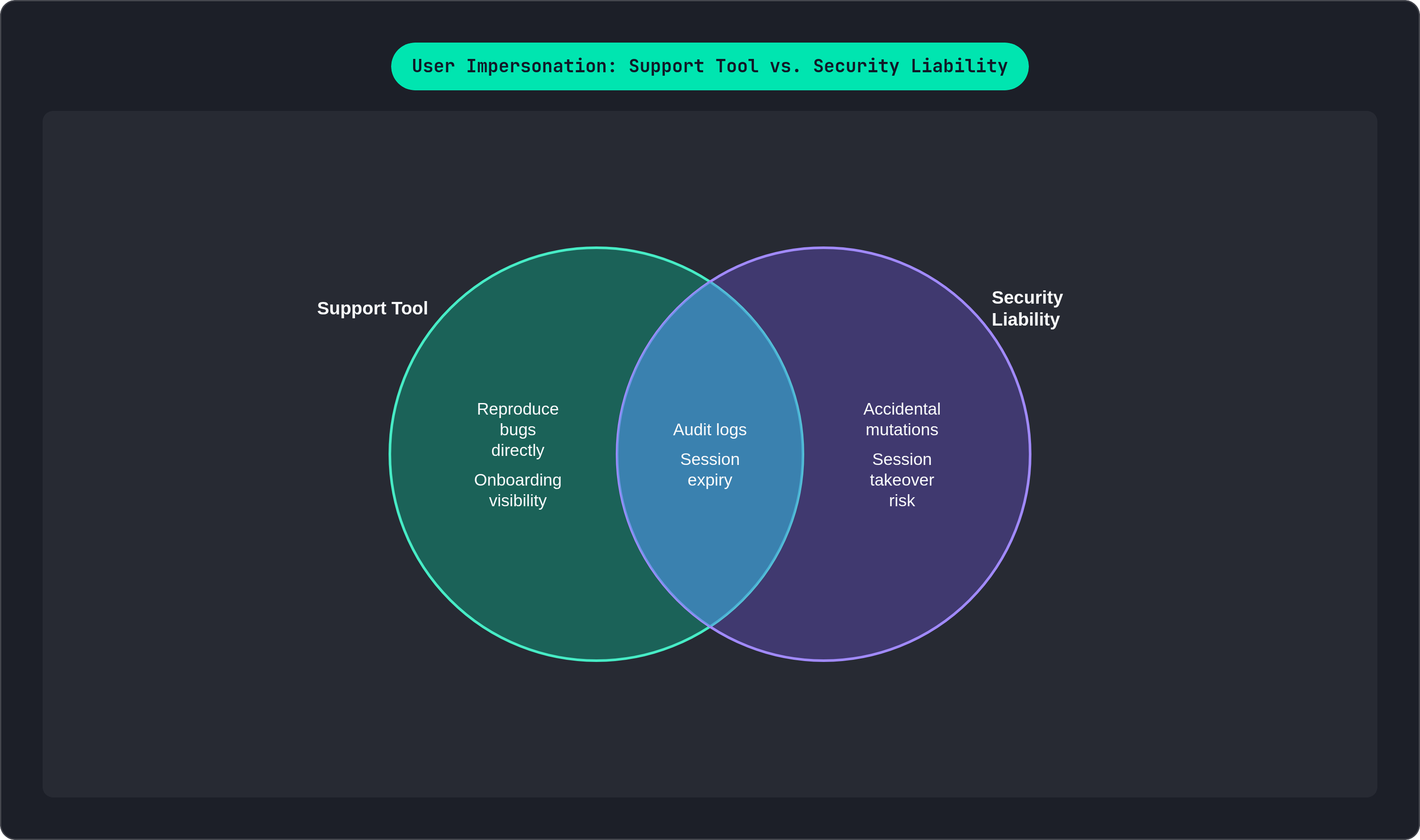
Impersonation replaces all of it. You look at the customer's setup directly, rather than asking them to describe it. You see what a new user sees during onboarding, in real time, rather than guessing. The whole category of "I can't reproduce this, it's something about your account" tickets disappears, because now you can just go check.
Worth noting: the ROI here sits almost entirely with support and onboarding. Engineers already have staging environments and log access. The frontline teams have been flying blind, and impersonation gives them eyes.
That's the pitch. Now the catch: this feature is either a genuine support tool or a security liability, and the line between the two is entirely about how you build it. There's no middle setting.
Where impersonation goes wrong before a line of implementation code is written
The most tempting mistake is treating impersonation as a full identity swap. You log in as the user, cookies and all, and now you basically are them. Feels efficient. It's also how things go sideways fast.
Most debugging requires seeing what the user sees, which is a narrower and safer problem than becoming the user. Conflating the two is where most impersonation systems go wrong before anyone's written a single API route.
Think about the mutation problem concretely. An agent is poking around in a customer's live account, trying to reproduce a rendering bug. They click a button they meant to click in their own test environment. Now a form got submitted, or a setting changed, in a real customer's real account. The audit trail attributes that change to the customer, because as far as the database is concerned, the customer's account just did a thing. Nobody flagged it. No warning appeared. The agent simply forgot, for a second, whose account they were standing in.
Then there's the RBAC-in-UI-only failure, which is depressingly common. A team hides the "Impersonate" button behind an admin role check in the frontend, and calls it done. Except the API endpoint underneath has no such check. Anyone who opens dev tools and finds that endpoint can impersonate any user they want. Hiding a button is not access control; it's interior decorating.
And one more classic: a poorly built system kicks the real customer out when an agent starts an impersonation session, because the two sessions collide on the same token or cookie. The customer gets logged out mid-task, no explanation, while a support agent is quietly poking around in the account they were just using. This crosses from impersonation into takeover, and it should never happen.
Building this correctly means four things, and the rest of this piece walks through each one: scoped permissions, immutable audit logs, sessions that expire on their own, and controls that hold up under GDPR.
Session architecture: how to keep the agent's identity and the impersonated session cleanly separated
The backend needs to know two things at all times during impersonation: who's actually doing the clicking, and whose account they're doing it in. Lose track of either one and your audit log becomes fiction.
The clean way to do this is a two-token setup. The agent's real JWT never goes away; it sits in memory the entire time, untouched. A second, separate JWT gets generated for the impersonation session, and that's the token that actually rides along on API calls while the session is active. It has its own expiry, independent of the agent's normal login. Every request the backend receives during impersonation carries both identities embedded in it: the actor, and the account they're acting on behalf of.
Refreshing the page shouldn't blow this up, but it also shouldn't leak credentials into places they don't belong. A three-layer storage approach handles this:
- In-memory: the actual JWTs live here. Refresh the tab, they're gone. That's the point; it's the most secure spot for raw tokens.
- sessionStorage: holds the metadata, not the tokens. Target account, active scope, the reason the agent gave for starting the session. Survives a refresh, dies when the tab closes.
- HTTP-only cookie: holds the agent's own refresh token. JavaScript can't touch it, and it survives everything short of the agent logging out entirely.
At the multi-tenant layer, this matters even more. The impersonation token should carry tenant context as an explicit claim, not something inferred from a lookup somewhere downstream. Cross-tenant access should be impossible because the token structure doesn't allow it, not because everyone remembered to write the right query. Isolation by construction beats isolation by convention, every time.
And through all of this, the customer's own session sits untouched. No logout, no invalidated tokens, no weirdness on their end. They shouldn't even know you were there, unless you tell them.
Scoping impersonation access: read-only by default, write access as an explicit escalation
Default to read-only. An agent trying to reproduce a UI bug doesn't need to be able to change anything, and giving them write access anyway is pure downside with no upside attached.
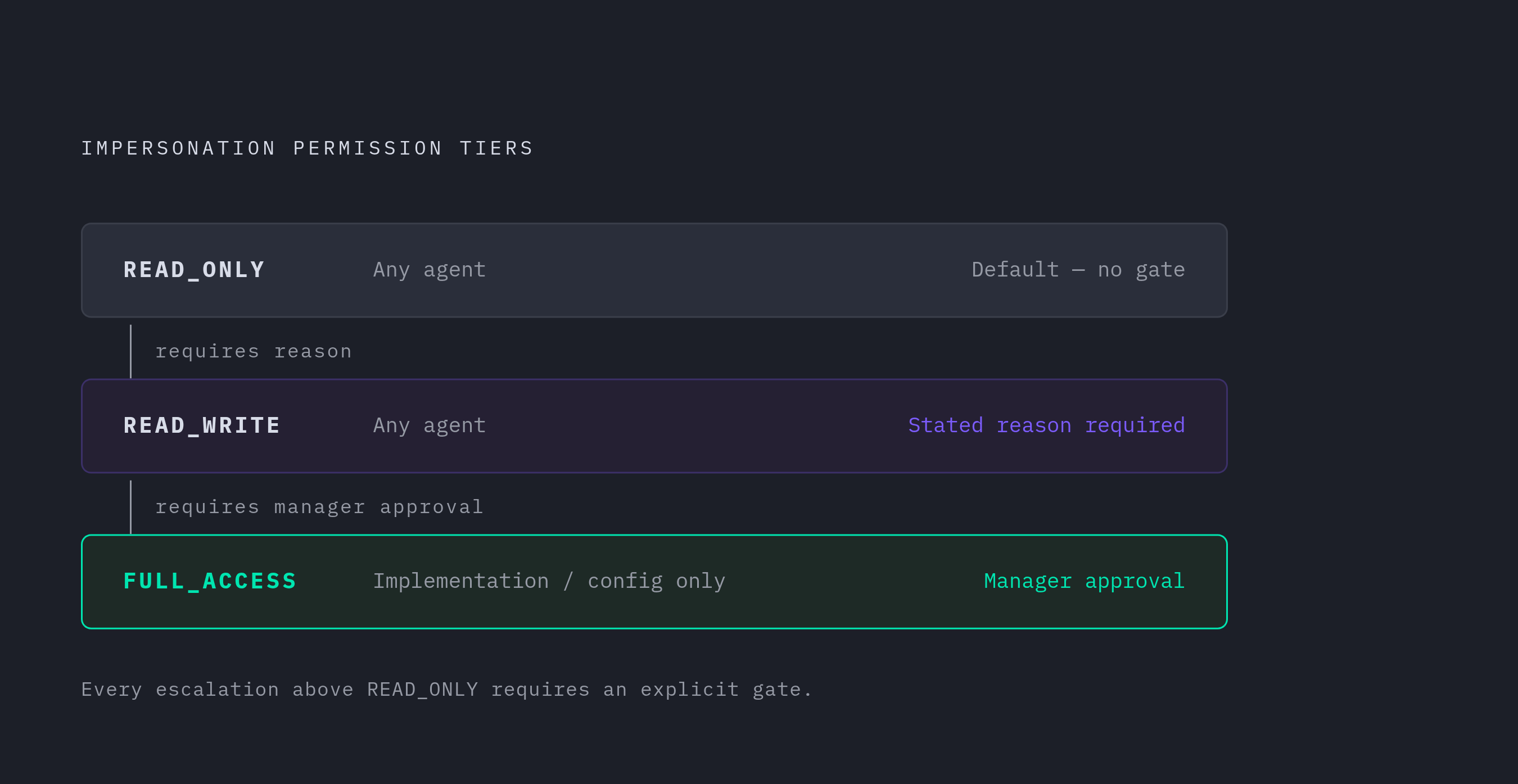
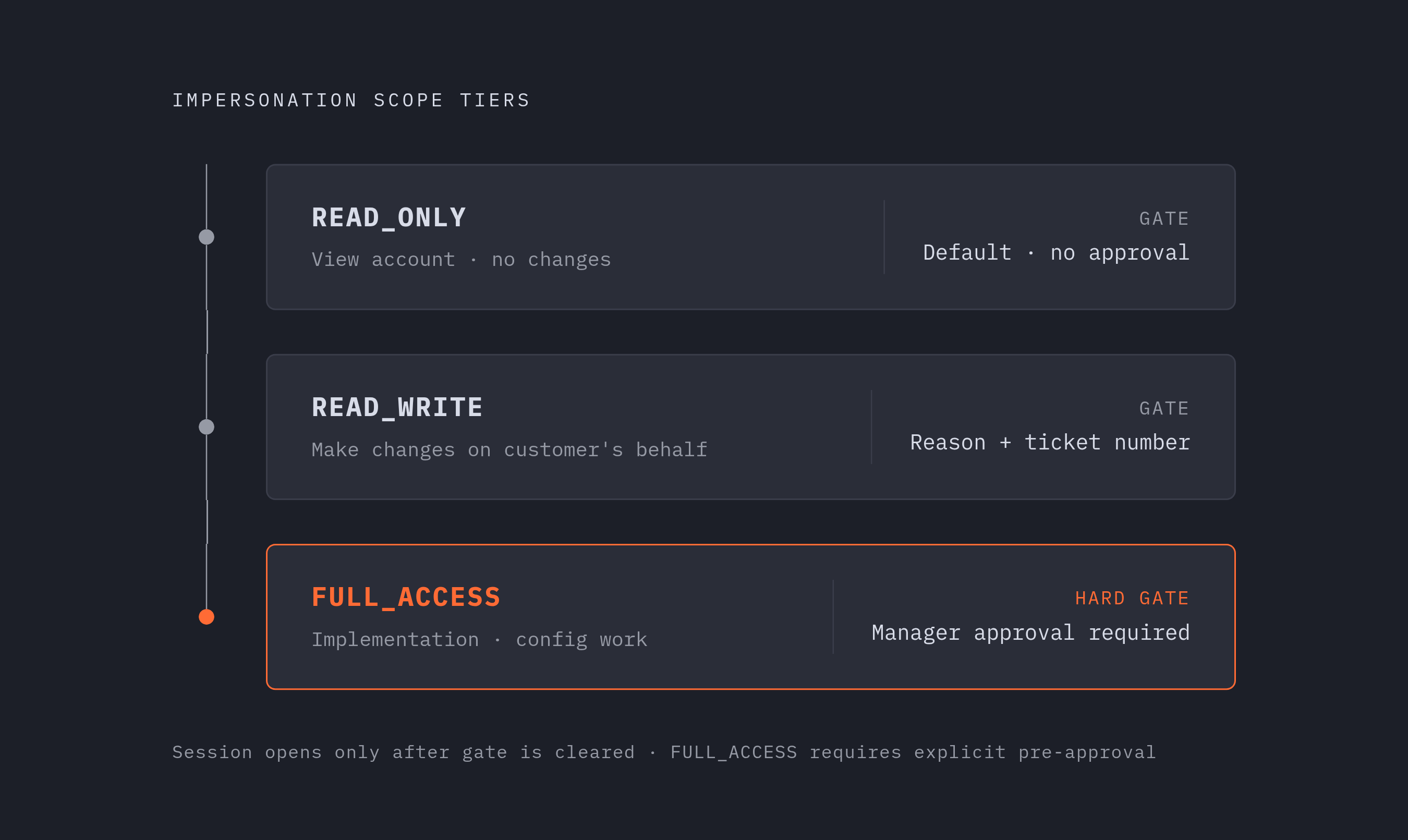
A three-tier scope model covers most support orgs:
- READ_ONLY: the default. Agent sees the account, can't touch anything in it.
- READ_WRITE: requires a stated reason, used when the support workflow genuinely involves making a change on the customer's behalf (fixing a misconfigured setting, say).
- FULL_ACCESS: rare, and gated behind manager approval. Reserved for implementation or config work that genuinely needs it.
The agent picks a scope when they start the session, along with a written reason and a ticket number, and all of that gets baked into the audit record before the session even opens.
Enforcement has to happen at the API layer. The impersonation JWT carries the scope as a claim, and every endpoint checks that claim before doing anything, rejecting write attempts if the scope says READ_ONLY. It doesn't matter what buttons the frontend shows or hides; if the backend doesn't check, the scope isn't real.
If you're on GraphQL, put the authorization directly on the mutation that starts impersonation, something like a role directive requiring admin access, so the resolver itself enforces who's allowed to even request a session. And that mutation should hand back a scoped token, never a full-privilege one, regardless of who's asking.
Defaulting to read-only quietly solves a problem most teams don't see coming: it wipes out the entire category of audit trails that get corrupted by accidental mutations nobody meant to make.
Session duration, the persistent UI indicator, and the behavioral guardrails that prevent quiet mistakes
Sessions need a clock. Fifteen to sixty minutes covers most real investigations, long enough to actually dig into a problem, short enough that nobody's impersonation session is quietly still open three shifts later.
Expiry should be automatic and non-negotiable. If an agent needs more time, they start a new session with a fresh reason, and that re-initiation gets logged as its own event. Some auth vendors, Stytch among them, build sessions explicitly around this idea: impersonation is for investigating a specific problem, not a standing backdoor into an account.
The other non-negotiable is a banner. A big, visible, can't-miss indicator across the top of the screen (colored border, different background, whatever gets noticed) needs to stay on screen for the entire session. Not a small icon in a corner. Not something that fades after five seconds. It has to be the kind of thing an agent sees out of the corner of their eye and immediately remembers where they are.
This banner is the thing standing between "agent clicked a button" and "agent accidentally clicked a button in a customer's live account because they forgot they weren't in their own test environment." It shouldn't be dismissible. If an agent could close it, they will, and then it's not protecting anyone from anything.
When a session ends, four things should happen without exception: the impersonation token gets invalidated on the server, the agent's original token comes back as the active one, the audit record gets an end timestamp, and the customer never noticed a thing.
What if the agent just closes the tab without formally ending the session? The sessionStorage metadata disappears with the tab. The HTTP-only cookie still holds the agent's own refresh token, untouched. And the server-side expiry clock on the impersonation token doesn't care whether anyone closed a tab; it runs out regardless.
RBAC for impersonation: who can initiate a session, who can approve one, and which accounts are off-limits
Not every support agent should be able to impersonate every customer. That sounds obvious written down, but plenty of systems ship with impersonation as a flat, all-or-nothing permission, because it's easier to build that way.
A tiered structure works better:
- Standard agents: can start READ_ONLY sessions for accounts assigned to them, with a required reason field, no approval needed.
- Senior or escalation-tier agents: can request elevated scope, which triggers a manager approval step before the session opens.
- Security-sensitive accounts: require manager approval no matter who's asking.
What makes an account security-sensitive? Enterprise customers who've asked for enhanced controls, accounts in regulated industries like financial services or healthcare, accounts with a contractual opt-out clause (more on that shortly), and accounts that got flagged after a prior access complaint.
The approval flow itself doesn't need to be fancy. A Slack message to the designated approver with session details and an approve or deny button does the job. What matters is that both halves of that exchange, the request and the response, land in the audit trail: who approved it, when, and why.
The reason field deserves its own callout, because it's the thing teams cut corners on first. It shouldn't be a dropdown with five canned options. It should be a written explanation, tied to a real ticket number, every single time, at every tier.
This connects directly to something compliance teams care about a lot. User access review failures are consistently among the most common reasons SOC reports come back qualified. A tiered, documented impersonation policy is exactly the kind of thing that fixes that finding before an auditor ever has to bring it up.
Building the audit log: what to record, how to store it, and what compliance teams will ask for
The audit log is the entire point of this exercise. Everything above exists to feed clean, trustworthy data into this record.
At minimum, every session needs: the agent's identity and role, the target account and specific user, the requested scope versus the approved scope (a mismatch there is worth investigating on its own), the stated reason and ticket reference, a start timestamp, an end timestamp written when the session closes, and a note on whether it ended manually, by timeout, or by expiry.
For teams that need more rigor, every write operation inside a session should get logged with a reference back to the session ID, giving you a full trace of what actually happened while the agent was in there. Smaller teams that don't have that infrastructure yet can get most of the value with a shortcut: tag every write event in your existing application log with an impersonation_context field holding the session ID. It's not as complete, but it catches the highest-risk actions without requiring you to build a whole new logging system first.
The log itself needs a few hard rules. Append-only, no edits, no deletes, ever, once a record exists. Stored separately from your general application logs, so someone with admin panel access can't quietly modify or delete an impersonation record. Encrypted at rest (AES-256 is the standard baseline) and encrypted in transit over TLS. And access to the log restricted to security and compliance roles specifically, not every admin user with a login.
Here's the question that eventually lands in your inbox from an enterprise customer's security team: "Has any employee accessed our account in the past ninety days?" The answer needs to come from an export, with names, timestamps, and reasons attached. A general assurance about taking security seriously doesn't satisfy anyone asking that question.
For SOC 2 purposes, a quarterly review summarizing sessions by agent, by account, and by outcome covers your periodic review requirement and, as a side benefit, surfaces weird patterns. If one agent is running an unusually large share of sessions against one account, that's worth a conversation, not a shrug.
GDPR obligations that attach specifically to impersonation access
Impersonation touches personal data, which means GDPR has opinions about it, and those opinions need answers before launch, not after a customer asks.
For most B2B SaaS companies, the lawful basis is a combination of legitimate interest (you're providing the support the customer is paying for) and contractual necessity. Your terms of service or data processing agreement should say, in plain language, that support staff can access customer accounts for support purposes. The audit log is what proves that access actually stayed within that stated purpose, rather than wandering somewhere it shouldn't have.
There's a subtler risk specific to impersonation that pure engineering teams tend to miss entirely: data residency. If a support engineer sitting in one jurisdiction impersonates a user whose data lives in another, that act can itself count as a cross-border data transfer under GDPR. The exposure comes from the access itself, not from where the data happens to sit in storage.
Hosting your backend inside Europe removes this problem at the infrastructure level for EU users, rather than leaning on contract language to paper over it. That's a structural fix, worth building around from the start rather than retrofitting once a customer's legal team asks about it.
Some enterprise contracts go further and negotiate a hard opt-out: no employee touches their environment without written consent, full stop. Your system needs a per-account flag that blocks impersonation sessions from even starting on flagged accounts, enforced at the API layer, so that no one can click past it with a UI warning.
And if a breach happens, one where impersonation access is even tangentially involved, the relevant supervisory authority needs notification within 72 hours, and affected users need to hear about it too if the risk to them is high. The audit log is what makes that notification accurate instead of a panicked guess. Any B2B SaaS company processing customer data also needs a data processing agreement with each business customer, and impersonation access belongs explicitly in that document, not left implied.
What off-the-shelf auth platforms give you and where you still have to build
Some auth vendors have started shipping impersonation as a named, supported feature rather than something you bolt together yourself. Stytch, for instance, offers it for both B2B and B2C setups, with session handling built around the idea that impersonation is a short, purpose-bound investigation tool rather than a standing access mode.
That's a real head start, and it's worth using if your stack already includes one of these platforms. The scope tiers, the approval workflow tied to your org chart, the account-level opt-out flag for that one enterprise customer who negotiated it into their contract, the specific audit fields your compliance team needs for their next SOC 2 review, all of that still has to be built, because none of it is generic. It's specific to your product, your customers, and the promises you've made them in writing.
The platforms hand you the plumbing. The judgment calls, who gets to approve a FULL_ACCESS request, which accounts are permanently off-limits, what counts as a good enough reason in that mandatory text field, stay yours to make. Impersonation done well looks almost boring from the outside: a banner, a timer, a reason field, a log nobody thinks about until the day they desperately need it. That's the goal. Boring is what safe looks like here.