Authentication Provider Migration Without User Lockout
Run both systems in parallel until every credential moves over safely.
Migrating authentication providers doesn't require locking anyone out, but it does require you to resist the urge to flip a switch and call it done. The real work is running two identity systems at once, on purpose, until every credential has moved over. Skip that step and you'll learn, the hard way, just how much auth actually touches: the front door, the hallway, and the guard checking badges for every single thing a user tries to do.
I've watched teams botch this three different ways, and it's always some version of the same story. Users get invalidated mid-session and can't log back in. Permissions don't carry over, so someone's admin dashboard suddenly thinks they're an intern. And somehow, every time, the one super-admin account that was supposed to fix all of this loses access too, because nobody remembered to migrate their credentials first. It's a bit like the locksmith locking himself out of his own shop. Then the helpdesk tickets show up in a wave that doesn't crest for days.
I once watched a mid-sized fintech team try to do this over a single weekend. They scheduled the cutover for Saturday at midnight, sent out a cheerful internal memo about "seamless transition," and went to bed confident. By the next morning, the support queue is flooded, a senior admin account is locked out, and someone is scrambling to locate a break-glass credential nobody remembered to migrate. They finished the job eventually, running both systems in parallel for far longer than anyone had planned — which is exactly what they should have budgeted for from the start.
Doing this in one clean batch, one weekend, one maintenance window, is exactly the instinct that causes all of it. Usually something forces the decision: an infrastructure upgrade, an identity provider changing its pricing or capabilities out from under you, or a compliance mandate demanding consolidation. Whatever the trigger, "zero-downtime" means one specific thing: both systems handle live traffic, at the same time, for as long as it takes. Real users, on both systems, simultaneously, for the full duration of the migration, rather than a quiet 2 a.m. maintenance window where you cross your fingers.
The architectural principle that makes zero-downtime migration possible
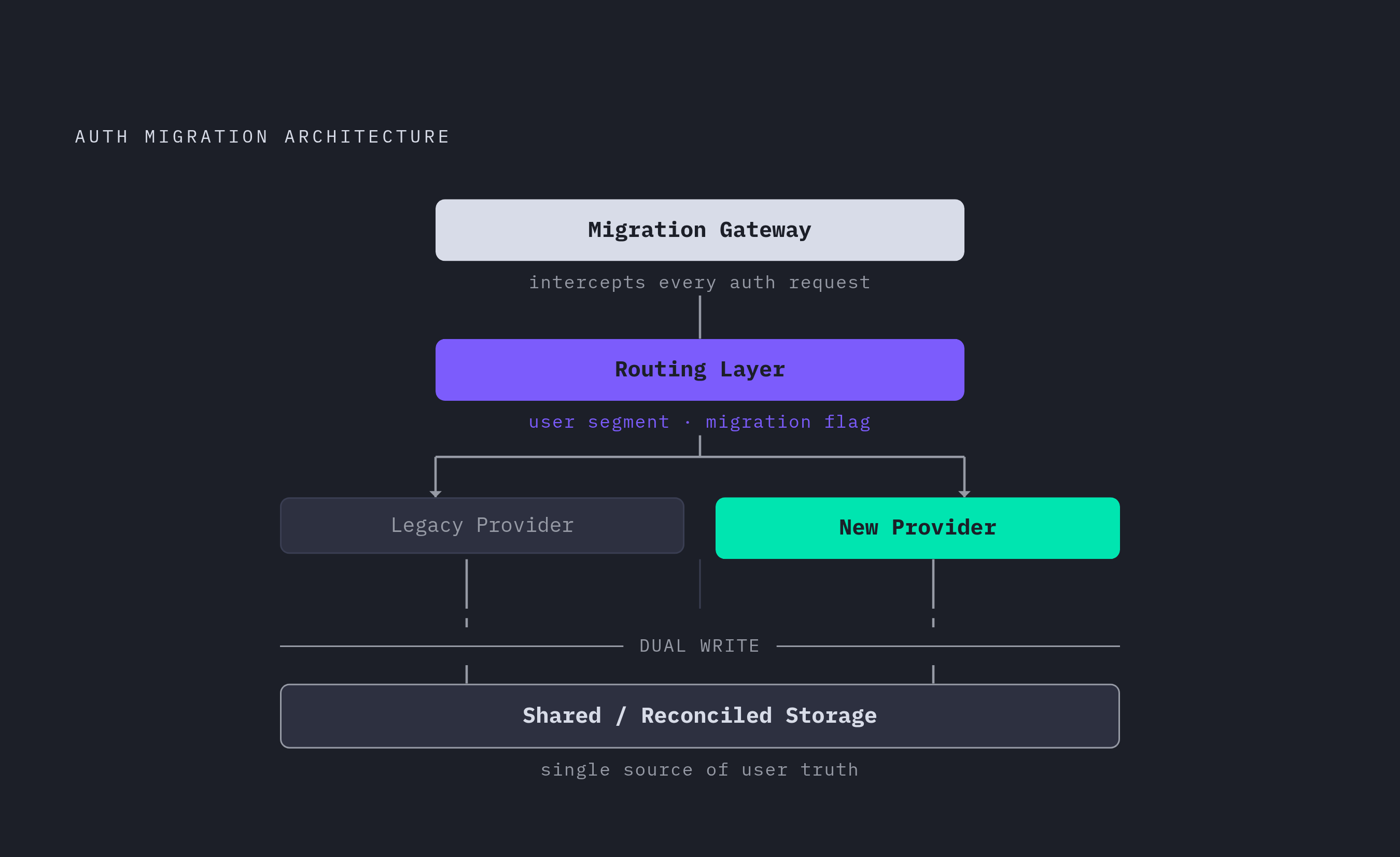
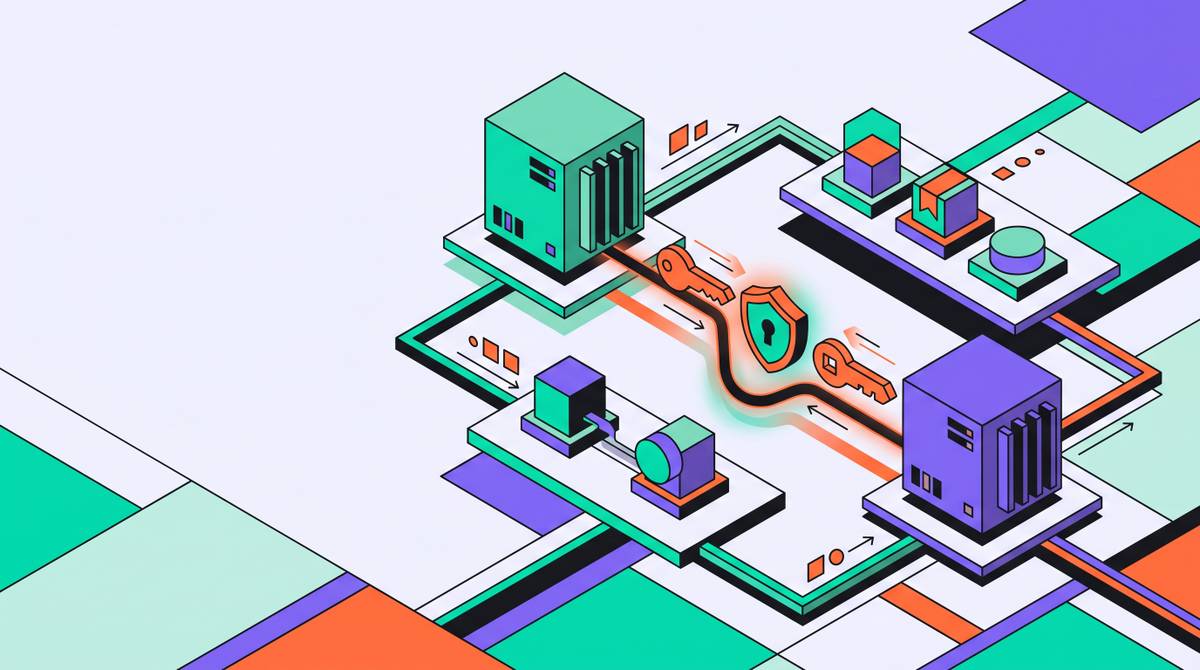
Run the old system and the new one side by side, and route each user to whichever one currently knows who they are. That's the whole idea, and everything else is detail. A 2025 paper in the European Journal of Engineering and Technology Research proposed exactly this architecture: a routing layer — a Migration Gateway — that forwards every authentication request to legacy or new, depending on where that particular user sits in the process.
Four pieces make it work. The gateway sits in front of everything, intercepting each auth request. A routing layer decides, using signals like user segment or a migration-progress flag, which backend actually handles it. A dual write strategy keeps credential state updated in both systems so neither one goes stale. And some form of shared or reconciled storage keeps the two providers from quietly drifting apart on what they each believe is true about a given user.
The alternative is a flag day, where every credential, session, and permission has to be ready at the exact same instant. One gap in that plan and real people get locked out of real accounts, at the worst possible moment, usually right before a demo or a payroll run. Running in parallel is a temporary, controlled state that ends the moment migration is verified complete, and it buys you something easy to undervalue: an actual rollback path. If the new system falls over, the old one is still sitting right there, still working, like a spare tire you hoped you'd never need.
Preparing the migration before a single user is moved
Before touching anything, audit the entire credential surface. Actually audit it, not the version where you skim a spreadsheet someone made two years ago. That means every active user and the auth methods they've actually registered, plus service accounts, API keys, and CI/CD tokens. Machine identities count too, and they're the ones everyone forgets until one breaks something in production at 3 a.m.
Map every application and service leaning on the current provider. A broken integration locks out a workflow just as effectively as a locked-out user, it just takes longer for anyone to notice, which somehow makes it worse. Then check which authentication methods are actually being used versus which ones are merely turned on. That gap between "enabled" and "used" is where the risk hides, quietly, like mold behind drywall.
Sort users by how much damage they can cause if something goes sideways. Internal and admin accounts go first, since they carry the biggest blast radius. Active daily users come next, highest volume, most likely to notice a hiccup and email someone about it. Dormant accounts go last, or get handled separately through credential backfill.
Set your numbers before Ring 1 ever ships. Reasonable targets to agree on include a lockout rate well under a few percent during ring deployments and a pilot pass rate above 95%, with helpdesk tickets trending down as migration continues, not up. Whatever numbers your team lands on, agree to them in advance, so "safe to proceed" isn't a debate happening live, mid-rollout, with someone shouting over Slack. And tell your users what's coming. Someone who hits a different login screen with zero warning will assume, reasonably, that something broke.
Standing up dual middleware and session bridging
The middleware has to look at an incoming JWT or session token and know, instantly, which provider issued it. That means two separate validation paths living in the same server-side code, one for legacy sessions and one for new ones, coexisting without stepping on each other's toes.
Session bridging is the piece that actually keeps people logged in through this whole mess. A valid legacy token mints a brand-new session token, without ever asking the user to type their password again. Stytch's Zero-Downtime Sessions feature does exactly this: takes an external JWT, an Auth0 token, say, and mints a fresh session from it, so the user never notices the plumbing changed underneath their feet. This one mechanism prevents the most visible, most infuriating disruption there is: getting logged out mid-task for no reason anyone can explain to you.
Feature flags decide who sees the new flow, scoped by user ID, IP range, geography, or a cookie, whatever makes sense for your setup. Flagged users get the new experience, everyone else stays on legacy, and nobody gets logged out in the process. Underneath it all, a reconciliation layer keeps state in sync between the two providers for as long as the parallel window stays open. Token formats don't line up between providers automatically either, and assuming they will is exactly the kind of thing that breaks quietly and shows up as a support ticket three days later, long after anyone remembers what changed.
The phased rollout: moving users in rings, not batches
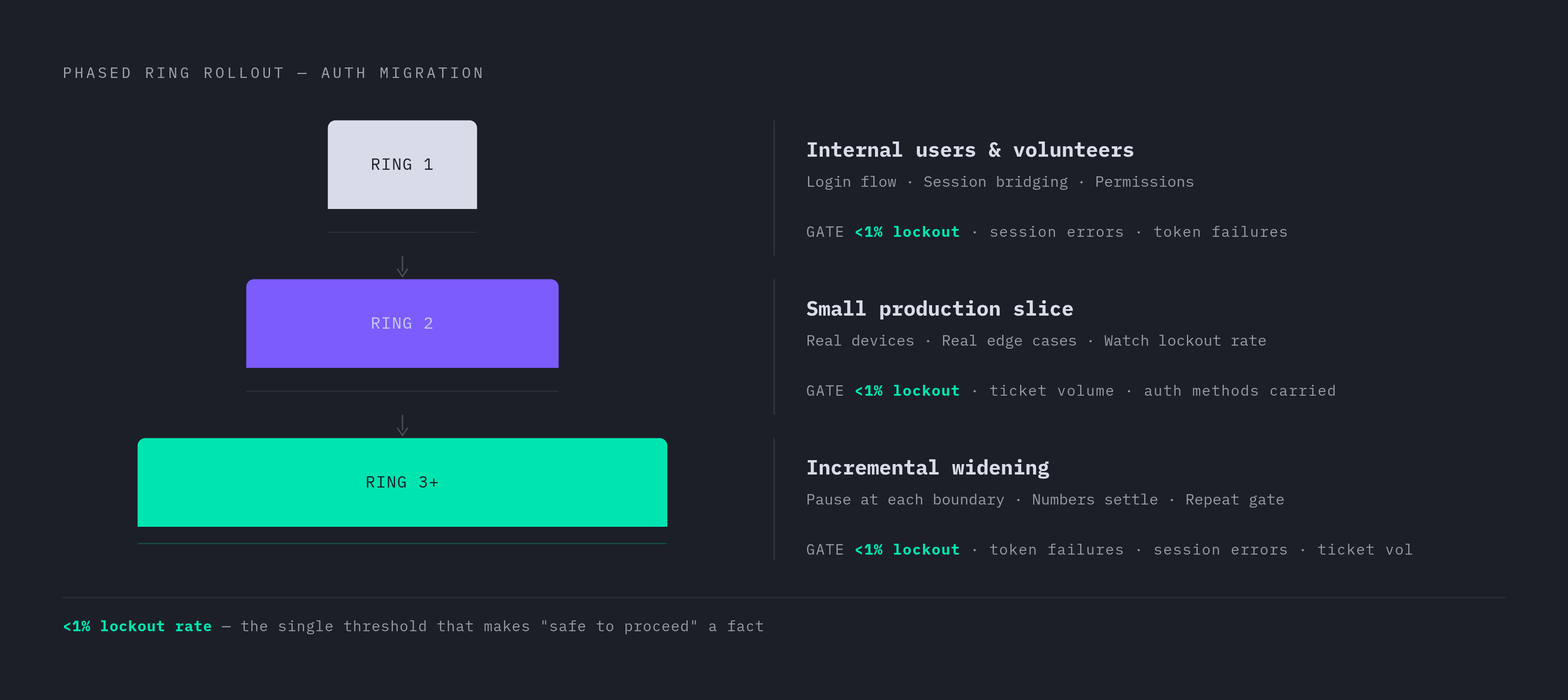
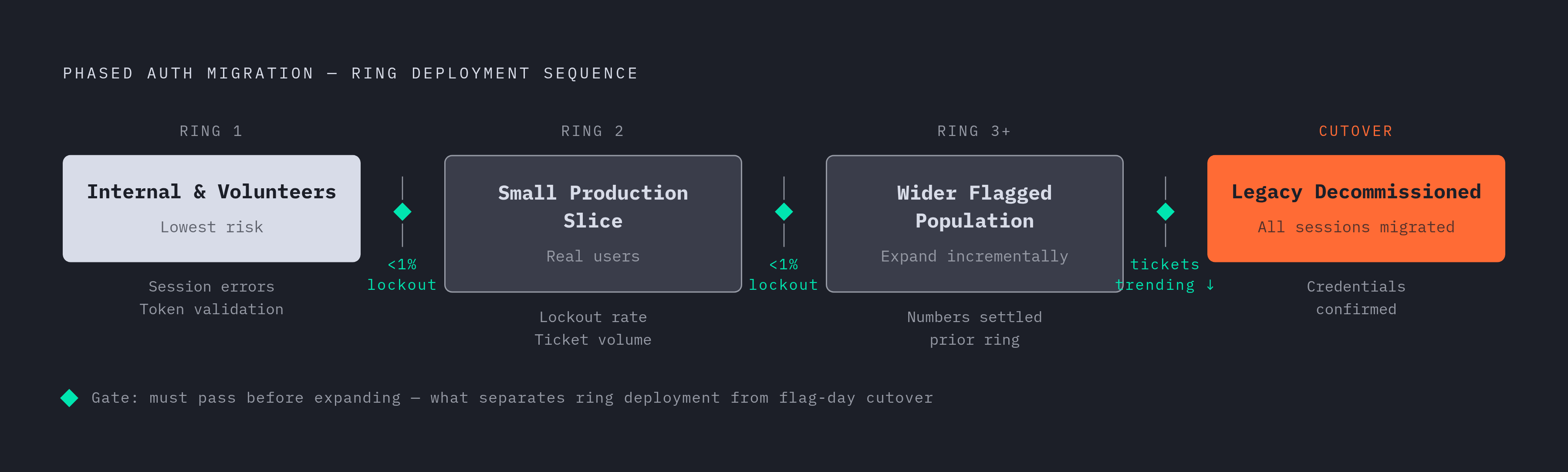
Ring 1 is internal users and volunteers, the people with the lowest risk and the highest tolerance for telling you bluntly that something's broken. This is where you confirm the login flow works, session bridging holds, and permissions actually carry over.
Ring 2 brings in a small slice of real production users, with real devices and real edge cases nobody thought of because nobody ever does. Watch lockout rate and support ticket volume closely here before letting anyone else in. Ring 3 and beyond is just repetition: widen the flagged population a bit at a time, and don't expand again until the last ring's numbers have settled.
At every boundary, check the same things: lockout rate (still under 1%, ideally), session errors, token validation failures, ticket volume and category, and any auth method that didn't carry over cleanly. The rollout should be pausable at any point, and pausing should cost you nothing, since the legacy system is still fully live underneath. Tell each ring what's coming before they hit it, and frame it as an upgrade rather than a disruption. Usually, that's the truth anyway.
Dormant users are a separate problem entirely. They're not logging in, so they never trigger the new flow on their own. Which means they need to be backfilled directly, or prompted to re-authenticate the next time they show up, whenever that is.
Credential backfill and the problem of users who never log in
Ring-based migration only catches people who log in during the window. Everyone else piles up as an unmigrated tail, and that tail doesn't shrink on its own. It just sits there.
There are two ways to handle it. Programmatic backfill exports hashed credentials from the old provider and loads them into the new one, assuming the new provider supports that kind of import, and the user never knows it happened. On-demand migration waits until the legacy system is gone, then triggers a one-time re-authentication the next time that dormant account tries to log in. That second option needs clear, calm messaging, or users will read it as a security incident instead of routine housekeeping and start changing passwords out of panic.
Password hash compatibility matters more than people expect. Not every provider hashes passwords the same way, so check before assuming a bulk import will just work; it often won't. MFA is the harder problem. TOTP secrets can sometimes be exported and reloaded. SMS-based MFA is portable in the sense that the phone number is just data, but the user still has to re-enroll on the new side. Hardware keys and passkeys can't be migrated at all. There's no shortcut there, the user re-registers them or loses that method.
Pick a cutoff date for backfill and say it out loud, publicly, to your users. Anything not migrated by that date gets flagged for forced re-enrollment the next time someone logs in, not silently cut off without warning. And log every backfilled credential with a timestamp, so there's a clean record of what moved and when, for whoever has to answer questions about it later.
What the Microsoft Entra deadline reveals about governance drift during migrations
Microsoft stopped letting admins manage authentication methods inside legacy MFA and SSPR policies as of September 30, 2025, and mandatory MFA enforcement for Azure lands in October 2026. This isn't hypothetical. It's a deadline a large chunk of enterprise IT is staring down right now, whether they've admitted it to themselves yet or not.
Here's the governance risk hiding inside coexistence: if a weak method, SMS being the usual suspect, stays enabled in the legacy policy, it stays usable, right up until governance is fully consolidated into the new system. Attackers don't care which system was supposed to be retired. A method that should be dead but is technically still live is still an attack surface, full stop.
Microsoft's own migration wizard handles this sensibly, letting admins move tenant by tenant and control the timing themselves instead of forcing everyone through the same door at once. The lesson generalizes past Microsoft: the parallel window during any auth migration carries real security risk, and the job is to shrink it while auditing method coverage the entire time it stays open. Regulations like PSD2 in Europe and NYDFS in the US expect phishing-resistant authentication for privileged roles, and governance drift during a migration can knock you out of compliance even if nothing ever gets breached. Treat the legacy provider's policy surface as live risk from day one of the new provider going up, not as cleanup you'll get to after cutover.
Machine identities and AI agents: the migration surface most teams miss
Most migration plans are written with human users in mind, which is a mistake, because service accounts, API keys, CI/CD bots, and AI agents get discovered late. Usually because something broke. And they get migrated under pressure, with no time to do it carefully.
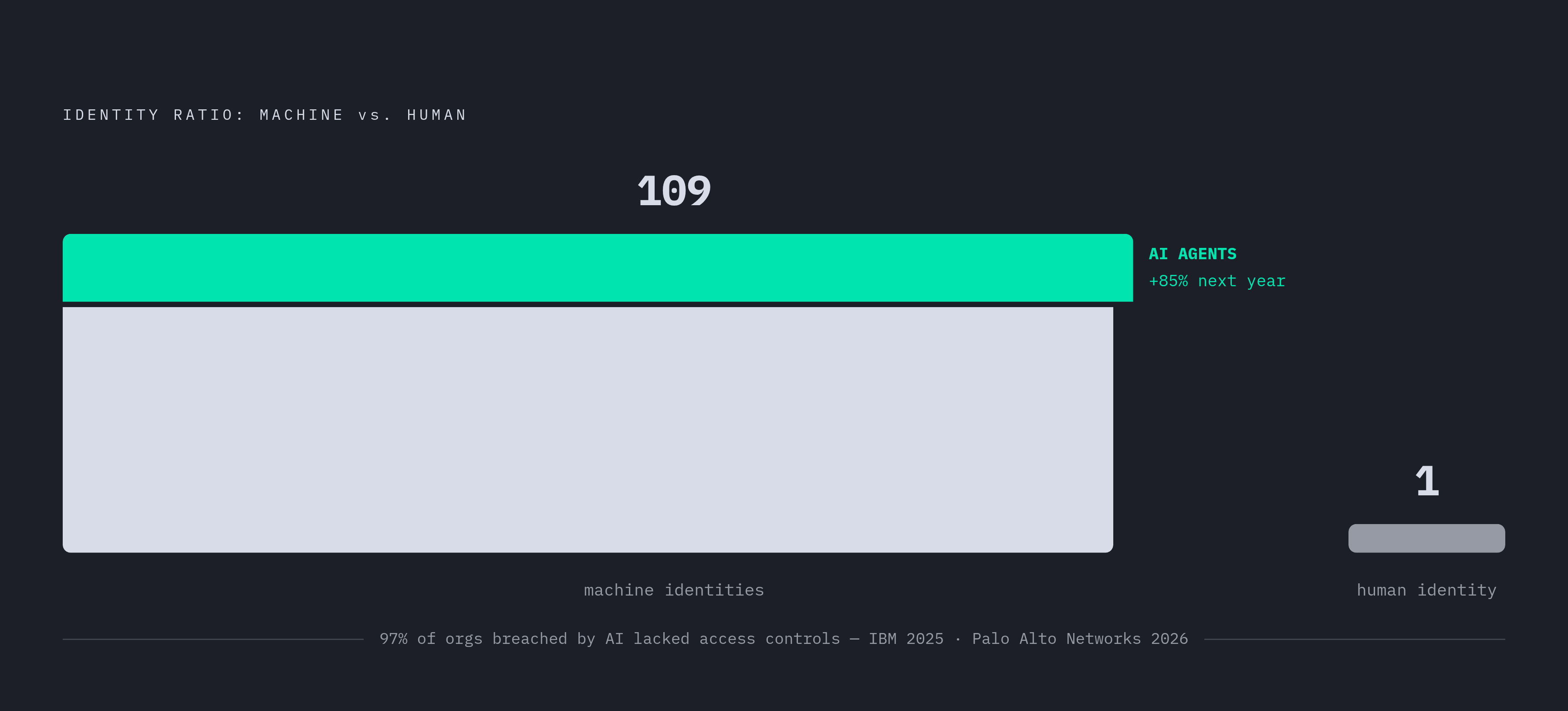
Palo Alto Networks' 2026 Identity Security Landscape report put the average at 109 machine identities for every human one, and that number isn't spread evenly either. AI agents are the fastest-growing slice, with companies expecting agent counts to grow 85% over the next year. Machine identities don't behave like human accounts, and nobody can prompt a service account to "please re-authenticate." They're often undocumented, discovered only once they fail loudly after cutover, and plenty are sitting on API keys that haven't rotated in years, quietly still working in production like nobody's watching. Because nobody is.
The MCP specification standardized on OAuth 2.1 for agent authorization, so picking a new provider that supports OAuth 2.1 natively sets you up to actually govern these agent identities, with real scoping, real expiration, real revocation. Practically: enumerate every non-human credential during the audit phase, assign an owner to each one (orphaned service accounts get decommissioned, not migrated), swap long-lived API keys for short-lived OAuth 2.1 tokens where you can, and test machine identity auth in staging before it touches a ring deployment. IBM's 2025 Cost of Data Breach Report found that 97% of organizations hit by an AI-related breach were missing proper access controls. A migration is the moment to close that gap, rather than carry it forward unchanged into a shinier system.
Final cutover: decommissioning the legacy provider cleanly
Cutover isn't an event you schedule. It's a confirmation you earn, and it should happen because migration is actually finished, not because a deadline on someone's calendar said it should be finished by now.
Before pulling the legacy provider's plug, check that every active user has either migrated sessions or backfilled credentials, every machine identity has been re-credentialed or shut down, no application anywhere is still issuing or checking legacy tokens, and auth-related helpdesk volume has settled back to whatever normal looked like before any of this started.
Decommission in stages. Stop new logins on the legacy provider first, but keep validating existing legacy sessions until they expire naturally. Pull that validation support too early and you'll log out exactly the stragglers who hadn't gotten to the new flow yet, which defeats the entire point of doing this carefully in the first place. Keep the legacy logs and audit records around after it's gone; compliance and incident response don't care that the system got decommissioned last quarter. Watch for authentication errors after cutover, too, since they're usually a sign some forgotten integration is still quietly pointed at an endpoint that no longer exists, like a phone ringing in a house nobody lives in anymore. Send one final note to users confirming it's all done. It closes the loop for anyone who noticed the transition, and it sets expectations for whatever the login experience looks like from here on out.
How auth infrastructure design decisions made during migration shape long-term product architecture
Migration is a rare moment when a team is already deep inside its auth infrastructure anyway, which makes it the cheapest time you'll ever get to fix the architecture for years to come, not just patch it for this one transition.
Getting it wrong is expensive in a specific, measurable way. Startups that pick the wrong auth platform at Series A regularly see cost increases of 10 to 15 times as they scale. Building it yourself carries its own costs too: a full custom implementation realistically runs $300,000 to $700,000, plus another 15 to 25% of that every year just to keep the lights on. As one exhausted engineering lead put it to me: rolling your own auth system is like building your own sewage treatment plant because you didn't like the city's water bill. Technically possible. Rarely worth it.
So evaluate the next provider on more than a feature checklist. Does it actually support the session bridging and import mechanisms this whole playbook depends on? Does it handle machine identities and OAuth 2.1 agent authorization natively, or is that a second system you'll end up bolting on separately, six months from now, under a different kind of pressure? Is user, session, and event data sitting in one place you can query, or scattered across three dashboards that don't talk to each other? The choices made under migration pressure tend to calcify into "how things just work here." Worth spending the extra week making sure that's a sentence you'll be happy with in three years.