User Impersonation and Support Access Patterns in SaaS
Support engineers need tight guardrails to prevent data leaks when accessing customer accounts.
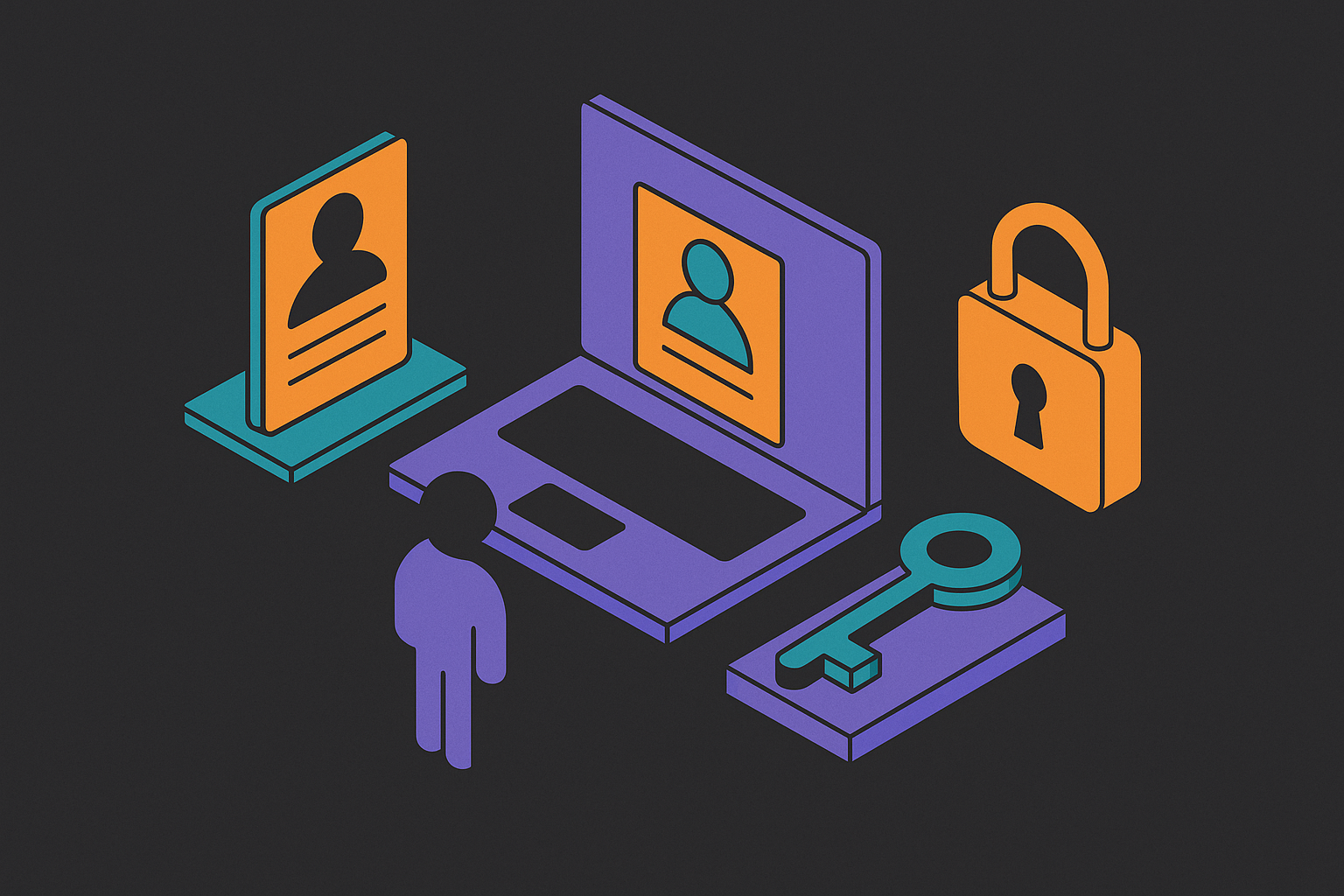
User impersonation lets a support engineer step into a customer's exact session and see precisely what that customer sees, permissions and all. It's one of the more useful tools in SaaS support, and one of the easiest to half-build. Most of the risk in this feature lives in the gap between "works in staging" and "doesn't leak someone's invoice history to a stranger in production," and that gap is what this piece is actually about.
Quick definition, because people use "impersonation" loosely and it causes arguments in Slack. When support impersonates a user, they can click buttons, change settings, submit forms. Full interaction, not a read-only account viewer. That's exactly why it's useful for debugging weird bugs, and exactly why it needs guardrails a screen-share session doesn't. A bug that only shows up from a strange mix of data, config, and three months of user behavior isn't reproducing in a test environment no matter how hard you stare at it. Screen sharing needs a customer sitting there at the right moment. Log inspection tells you what already happened, not what's happening right now. Impersonation is the only one of the three that gives you a live, interactive window into a specific account's actual state, mid-problem.
It shows up constantly. Tier-1 gets a bug report they can't reproduce and kicks it up the chain. A CSR walks a non-technical admin through a setting by just... doing it, inside their account, while the admin watches. Engineering skips the "can you send a screen recording" back-and-forth and looks at the broken thing directly. Nobody's arguing the feature shouldn't exist. The real question is whether it got built with any care at all.
Why most teams build impersonation wrong the first time
Here's what almost everybody ships on the first pass: an admin flag in the database, a backend that swaps the session's user ID, done. Looks fine in the demo. Ships because there's a customer on fire and nobody's got the bandwidth to think about edge cases at 11pm on a Tuesday.
What gets cut is everything that isn't the happy path. Every single time.
No visual indicator, so the impersonated screen looks exactly like the admin's own screen, nothing telling anyone a session is even live. No audit trail, so the action happens and vanishes, no record of who did what or why. No session boundary, so impersonation just rides along on the admin's normal login until they log out whenever they feel like it. No scope restriction, so the impersonator can do anything the real user can do, including the stuff you really don't want undone by a stranger with good intentions.
Most auth tooling doesn't bail you out here. WorkOS's 2025 guide on B2B user management points out that most auth SaaS products don't ship impersonation support out of the box. Teams end up hand-rolling it, and hand-rolled is exactly where corners get cut under deadline pressure, because nobody hand-rolls a feature and also hand-rolls the fifteen edge cases nobody asked about yet.
There's an organizational wrinkle too, and it's sneakier than it sounds. IT departments typically control only a slice of a company's total SaaS spend, with business units driving the rest, so "who decides who can impersonate whom" often isn't anybody's clearly assigned job. Impersonation permissions inherit that fuzziness instead of fixing it. Nobody decided this on purpose. It just sort of accreted, the way clutter does on a kitchen counter nobody's assigned to clean.
The feature works great 99% of the time. Then the one time it doesn't becomes the incident report everyone reads in a meeting they didn't want to attend.
The minimum set of controls that make impersonation safe to ship
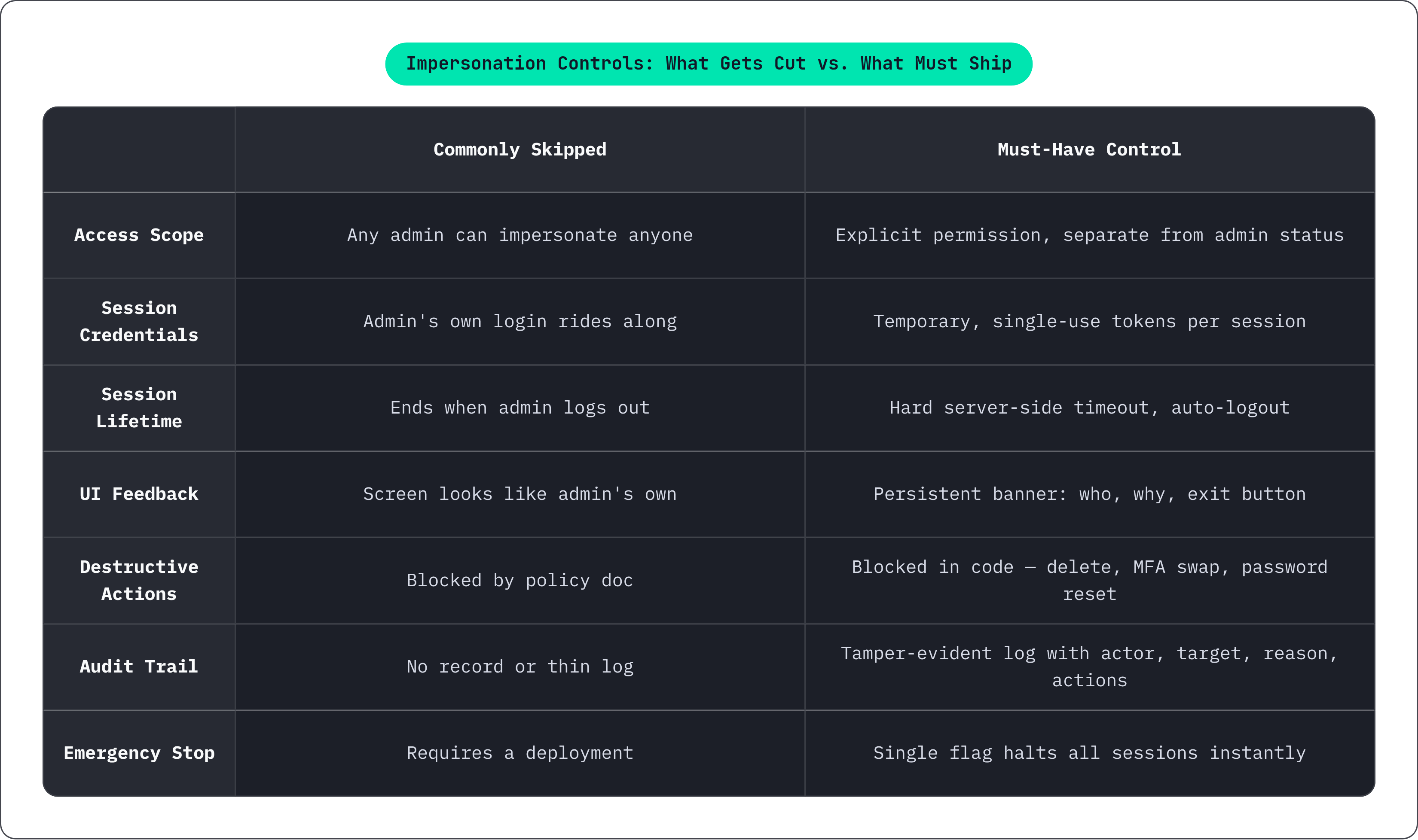
None of this is exotic, and the checklist is short enough to fit on an index card.
Scoped access first: decide exactly who can impersonate, as its own permission, separate from general admin status. If every admin can impersonate every user, that's not a security model. That's a suggestion with extra steps. Some contracts require support staff in a specific region to be the only ones touching a given account, and the system needs to enforce that, not a policy doc sitting in a wiki nobody opens.
Sessions need temporary, single-use tokens generated fresh each time, not the admin's own login credentials tagging along for the ride. Hard timeout, server-side, auto-logout, so nobody's left with lingering access because they forgot to click "end session" before lunch.
The UI needs a visual flag. Always. A banner, a badge, something loud enough that nobody confuses an impersonation session with their own normal login. Who's being impersonated, who authorized it, one click to get out. A UI with zero indicator isn't a minor gap; it's the feature failing at the one job it had.
Destructive actions get blocked in code, not in a training doc nobody reads until after the incident. Deleting the account, swapping MFA, resetting a password, anything you can't take back: documentation doesn't stop a click, but code does.
A kill switch matters more than people think. One flag, flip it, impersonation stops everywhere instantly, no deployment cycle required. Wire it into the actual code paths, not the button that starts a session.
And where the account's sensitive enough to warrant it, add a consent layer: support pings the user (email, text, in-app, whatever fits), waits for a yes before opening the session. Keep internal IDs out of that notification. If someone intercepts it, they shouldn't learn anything about how your system's put together.
What the audit log needs to capture — and why a thin log is almost as bad as none
An audit log is the only honest answer to "who was in this account, and what did they do." Skip it, and that question doesn't get an answer. It gets a shrug.
A log worth keeping records who impersonated (the actual person, not "an admin"), who they impersonated, when it started and ended, why (a ticket number, a reason, anything), and what happened during the session, ideally down to what got read or changed, at minimum which pages got touched. It also needs to note whether the user consented or whether support just let themselves in.
Thin logs are the trap. They feel like coverage while giving you almost none of it. "Impersonation occurred" tells you nothing useful about what happened next. A log the same admins doing the impersonating can edit or delete is worse than no log at all, because it hands you false confidence instead of an honest gap. And a log with no retention policy has a funny habit of expiring right before a regulator asks to see it.
WorkOS's 2025 guidance frames the enterprise standard clearly: audit logs need rich metadata and need to be tamper-evident, meaning nobody quietly edits the record after the fact. Not a nice-to-have. The bar.
There's a side benefit worth mentioning. A solid audit log doubles as a debugging tool. Someone fat-fingers a config change while "just looking around," and the log becomes how engineering reconstructs the timeline afterward. Though the log's only as trustworthy as the access model sitting underneath it; if ten people can impersonate anyone at will, the log will faithfully record who did it without ever telling you whether they should have.
How GDPR reshapes impersonation from a technical problem into a legal one
GDPR doesn't care where your office sits. It cares whether you serve EU users, and if you do, you're in scope. Full stop, no exceptions for good intentions.
Impersonation is personal data access, plainly. Support stepping into a user's account means looking at that person's data, their behavior, sometimes their messages. Under GDPR's accountability principle, that counts as a processing activity, and it needs documentation like one. A regulator or a Subject Access Request comes asking who accessed an account and why, and "we're not totally sure" is not an answer anyone wants to give out loud, in a room, to a person with fining authority.
Data minimization matters here too. Support should see what's needed for the specific problem in front of them, not the whole account by default. An impersonation feature that opens everything every time works against that principle directly, and regulators notice the difference.
Regional restrictions aren't just politeness; they carry real legal weight. Certain contracts and regulated industries require support access to stay inside a jurisdiction, and letting a rep outside the EU into an EU user's account can trip GDPR's rules on cross-border transfers under Chapter V.
Host the data in Europe, enforce regional scoping in the impersonation system, and you've got something defensible: data stays where it's supposed to, access gets logged the whole time. The reassuring part, actually: GDPR-conscious impersonation and secure impersonation share the same checklist. Build one system correctly and it satisfies both requirements at once, which is more than you can usually say about compliance work.
Multi-tenant architecture and why tenant boundaries must hold during impersonation
Most B2B SaaS runs multi-tenant, meaning lots of customers sharing the same infrastructure, kept apart by logic instead of physical walls. Billing, permissions, business rules, all of it scoped at the organization level rather than per user.
Three things matter here: user, organization, membership. An impersonation session has to respect the same org-level boundaries the real user's session respects. No exceptions, no "just this once."
Weak tenant isolation is where things go sideways fast. An impersonation session that doesn't correctly inherit org-level scoping can show a support engineer data from a neighboring tenant, meaning they end up seeing more than the actual user could ever see themselves. Not a small bug, that one. Things get worse in AI-powered products: if there's retrieval-augmented generation running over user-uploaded documents, the impersonation session needs to be tenant-aware at the retrieval layer itself, not just slapped on at the UI. A nice loud banner up top does nothing if the backend's quietly pulling documents from the wrong company underneath it.
Systems where user identity, org membership, permissions, and session state all live in one coherent place have a real edge: scoping gets enforced once, consistently, everywhere. Fragmented setups, where user data and org data live in separate services syncing on their own independent schedules, are exactly where these boundary failures sneak in. Role-Based Access Control, scoped per organization, is the prerequisite here. Without it, an impersonation session has no ground truth for what the user's even allowed to see in the first place.
What well-implemented impersonation reveals about the health of your customer data model
Building impersonation right forces a company to answer questions it's probably been quietly dodging for a while.
Can you actually reconstruct what a specific user sees, right now, from your data? "Sort of" means your data model has gaps somewhere. Do you know, precisely, what "acting as this user" means in terms of permissions? Fuzzy answer there means your access model is fuzzy too, and fuzzy access models tend to surface at the worst possible moment. Could you walk a regulator through every access event from the last three months without flinching? If not, the audit infrastructure isn't where it needs to be yet.
Impersonation ends up being a forcing function for building an actual unified customer view. A support engineer stepping into an account should see account state, subscription status, recent activity, and open tickets, all in one place, not scattered across browser tabs. Getting that picture by logging into four different tools means the backend is fragmented, and the impersonation feature will only ever be as good as the data it can pull together.
There's a product-analytics wrinkle too. Impersonation sessions generate behavior data just like regular usage does. A well-instrumented product feeds what the support engineer sees during that session into the same event stream as everyday activity, which makes it a lot easier to tell whether something's a one-off fluke or an actual systemic problem.
Here's where the fragmentation really shows up: teams that built auth, billing, and user management as separate services usually find out the hard way that impersonation means stitching together three or four data sources live, under pressure, with a customer on the phone. The mess of that stitching is basically a mirror held up to how fragmented the backend already was, whether anyone wanted to look at it or not.
Building impersonation on top of a unified backend versus assembling it from separate services
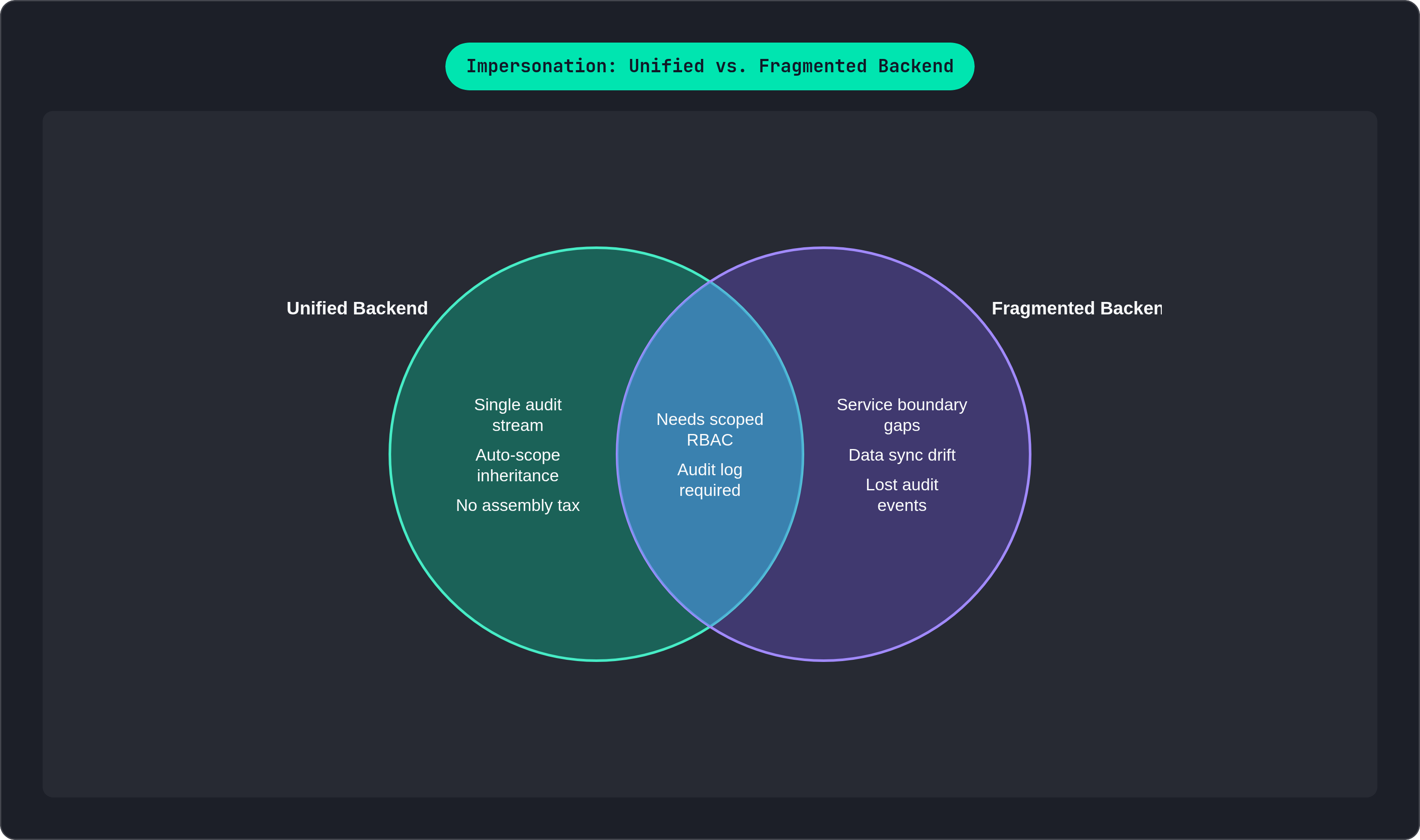
Call it the assembly tax, because that's what it is. When auth, user data, and billing live in different systems, every impersonation request has to cross several service boundaries to get its job done. Each crossing is a spot where scoping quietly breaks, data drifts out of sync, or an audit event vanishes into the gap between two systems that were never really designed to talk to each other in the first place.
A unified backend skips that tax entirely. User identity and org membership sit in one place, so there's no syncing needed to figure out what the impersonated user can see. Auth events, billing events, and product usage land in a single audit log, so the impersonation session shows up in the same stream as everything else instead of off in its own silo. Permissions and feature flags get scoped consistently at the org level, so the session just inherits the right scope automatically, no one stitching it together by hand at 2am.
Tiun is a concrete example of what that looks like in practice. It combines authentication, a customer database, payments, and analytics into one system, so account state, subscription status, usage data, and recent events all sit in one place instead of scattered across four different tools with four different logins. It hosts data in Europe with GDPR compliance built into the foundation, so regional scoping for impersonation lines up with the infrastructure instead of fighting it every step of the way. It's built for AI-native and agent-driven workflows, so impersonation controls and audit logs can be managed programmatically, which matches how engineering teams actually work these days. And because it acts as Merchant of Record, the billing state a support engineer sees mid-session is the real number, not a cached copy that synced from some other service an hour ago and quietly went stale.
The practical upshot: a team on a unified backend writes impersonation once, and writes it right the first time. Everyone else is retrofitting controls onto a system that was never built to give a coherent view of any single user to begin with, one patch at a time, forever.